
Obsticale Alert Module: ClearPath
Krystal Falokun
Fairview School
Grade 6
Presentation
Problem
Introduction
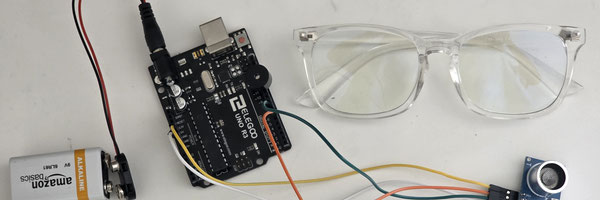
My project's name is ''Obstacle Alert Module: ClearPath". ClearPath is a smart wearable device that is designed to assist visually impaired/people at risk of impact individuals navigate at/above the user's eye level. It requires specifically an ultrasonic sensor mounted on the top bar of the glasses; which alerts the user that an object/obstacles is near and that they need to avoid before colliding with the object and become injured badly.
Hypothesis
If a visually impaired/people at risk of impact were to use my project, then they will experience less collisions with objects, because their glasses will be able to sense obstacles at height.
Problem
The specific problem I am trying to make a solution for is when an incident occurs with a blind person at an over head level, their cane wouldn't pick up the overhead object, causing them to hit it.
Example of Over Head Obstacles Blind People Deal With
As you can see in the example, his cane didn't detect the car that was parked in the middle of the road; making him hit the car. So, I made a solution for that by using sensors.
Method
Procedure
First, research sensors thoroughly to gain a better understanding of the electronic components in my project. Then, I will connect the correct pins needed for this project, including 6,7,GND, and 5v. Lastly, coding the Arduino and sensor to automatically beep when an object is 30cm away from the user.
Code
Code Keys Explained
- const int (Constant Numbers): These are like super important rules that set pin numbers (which wires to use) and the distance limit. In simple terms, they are a part of code that never changes, so my pin; ECHO is connected to pin 7, which will never change.
- float (Decimal Numbers): These help count tricky measurements that consist of decimal numbers like 0.983cm or 75.52cm away.
- durations_us and distance_cm: They are scoreboards and the Arduino writes down every second or time a new distance is followed.
- setup(): A setup() is like you getting ready before class or getting ready to meet up with your friends. They only run once to tell the computer to do certain things before it does the real deal.
- loop(): A loop() most of the work (not necessarily). It repeats the same code over and over again until you change the code.
- pinMode: This tells the pins if they need to wait of for a signal to come in or wait.
- ditigalWrite(): This is like the on/off switch for the Arduino.
- pulseIn(): This acts like a stopwatch, measuring how long it takes for a sound to come in.
- delay(): A delay is like taking a break, it makes the Arduino relax for a moment before it crashes.
const int TRIG_PIN = 6;
const int ECHO_PIN = 7;
const int BUZZER_PIN = 11;
const int DISTANCE_THRESHOLD = 18;

float duration_us;
float distance_cm;
void setup() {
  Serial.begin(9600);

pinMode(TRIG_PIN, OUTPUT);
pinMode(ECHO_PIN, INPUT);
pinMode(BUZZER_PIN, OUTPUT);}

void loop() {
  digitalWrite(TRIG_PIN, LOW);
  delayMicroseconds(2);
  digitalWrite(TRIG_PIN, HIGH);
  delayMicroseconds(10);
  digitalWrite(TRIG_PIN, LOW);

 duration_us = pulseIn(ECHO_PIN, HIGH);
 distance_cm = 0.017 * duration_us;

if (distance_cm < DISTANCE_THRESHOLD) {
 digitalWrite(BUZZER_PIN, HIGH);  }

else {    digitalWrite(BUZZER_PIN, LOW);  }

Serial.print("Distance: ");
Serial.print(distance_cm);
Serial.println(" cm");

delay(500);}
Analysis
Research
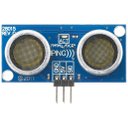
Ultrasonic sensors: -What is it? An ultrasonic sensor is a specific type of sensor that measures where objects are by using sound waves. The sound waves are always very high, even humans can’t hear it. Once it emits its sound on an object, it will then start to measure how far away the sound waves bump or pick up a certain object.
-How does it work? The circular “speaker’’ on the left is the transducer/transmitter, which produces high frequency sounds called ultrasound. These sound waves hit an object then bounce back (echoing) . The receiver, which is the right circular “speaker”. The echoed pulse will then be detected by the receiver. The sensor always emits a high frequency sound, but when the echo is received, the output will go low, causing the Arduino to read the length of the sound pulse and determine the distance using sound. Since that wouldn’t be our units, the Arduino will divide by two, causing us to have our answer.
-Wiring The ultrasonic sensor has 4 pins: VCC, Trig, Echo and Gnd.
- VCC and Gnd are power pins. VCC must be connected to five volts (5v on Arduino) while Gnd must be connected to ground.
- Trig is the trigger to emit the sound waves. It must be connected to a digital pin which are 0-13.
- Echo is the output pin, which is the one that sends the timing pulse. Echo must be connected to a digital pin as well. (0-13)
Math
- First the sensor seeds a beep and hears the echo (to the receiver) 2 seconds later.
- We already know the speed of light is 340 meters per second.
- Multiplying will be out next step:
- 340 x 2 = 680
- This is the total trip from the transmitter making the sound waves till when the receiver hears it.
- Divide by 2
- 680/2=340
- The object is 340cm away! I divided because 2, because we found the total trip, which isn't what we want; the objective is to know how far away the object is, so dividing by two helps us to know when an object is found. But don't worry, the Arduino will do all that math!
Conclusion
Conclusion
In conclusion, the main purpose of this project was to design a pair of assistive detecting glasses that use an ultrasonic sensor to detect objects at face level within 30cm of range. It's purpose was to warn visually impaired/ people at risk of contact accident that an object is coming instead of being over reliant on a cane or guide dog. Based on the results, the device was able to detect obstacles, beep on time, and alert the user, which answered my question "Can I make a solution for that with sensors and successfully stop collisions like these?". As objects moved closer to the sensor, the Arduino was able to pick up it's presence and beep. If the object was right in front of the sensor, it wouldn't beep because the ultrasonic sensor wouldn't be able to pick it up.
Citations
Acknowledgement
Acknowledgments
I would like to acknowledge my family for encouraging me to this project. YouTube channels like 'HR Robotics', 'Robonyx', and 'The Tommy Edison Experience'. A big thank you to YouTube Channel named 'Science Buddies' for giving me the idea and inspiration. Thanks to Mr. Halle for reviewing my project and recommending what could be enhanced/better.
Without all of you, my project would never have been possible. Thank you all for your encouragement and support.