
Project SongBird: A Wearable Two Way Device for Sign Language Recognition and Translation Using Computer Vision and Machine Learning
Emelia Chong
John G. Diefenbaker High School
Grade 10
Presentation
Problem
In our ever changing world where communication barriers continue to hinder deaf individuals unable to speak, sign language is tremendously crucial for a means of expression and communication for these individuals. Despite this being more common than asthma, diabetes or heart disease, deaf individuals often face barriers to accessing vital services, including public services and proper healthcare, due to a lack of readily available and accessible sign language interpreters. Presenting significant challenges, the necessity of a human interpreter prevents natural and seamless communication, and can result in significant social, educational, and developmental delays for deaf children when proper education and care is neglected. Making it difficult to divulge information, these communication barriers can lead to misdiagnoses and mismanagement, and remains a global challenge, with many deaf people unable to rely solely on facial expressions and lip movements. Given that sign language is not part of the school curriculum in most institutions, many deaf individuals experience health inequalities and lower quality of life in the deaf community, linked to higher rates of mental health issues. Therefore, there is an imperative and pressing need to incorporate sign language into the training and education for healthcare workers, provide more human interpreters, and create more easily accessible and wearable technologies.
Throughout the world, there are about 70 million deaf people and over 300 different sign languages, according to the World Federation of the Deaf, with many more people living with some level of hearing loss and millions who utilize sign language. Contrary to the popular belief that sign language is the same all around the world, there is, in fact, no single universal sign language, and sign languages are as different as spoken ones, with each community and country having their own unique one. With each sign language connecting deeply to their culture, many people all around the world have not learned and do not understand sign language, causing people to misunderstand deaf communities' unique indentities.
Question
How might we effectively and non-invasively translate real-time sign language gestures into spoken words or text to help facilitate seamless conversation between deaf and hearing individuals of all ages in everyday life?
Project Objectives
Giving a voice to those who are unable to speak, Project SongBird aims to foster a more inclusive society with a wearable non-invasive device that allows for more seamless communication between deaf and hearing individuals, translating sign language or hand gestures into spoken words or text in real time. Breaking down communication barriers, this project has the potential to solve real-world communication challenges and can reduce reliance on human interpreters, providing independence in daily life or work for deaf individuals.
The Meaning Behind Its Name
Representing new beginnings, hope, and the continuity of life even after dark times, the name for this device, the SongBird, was chosen because of its powerful symbol of unique voice and self-expression, helping people find their true identity and voice. In many cultures and traditions, birds are considered sacred messengers between earth and heaven, and their songs and flight represent transcendence and release from suffering, symbolizing divine connection and the power of communication.
Inspiration
During the Alberta teacher strike, I was inspired to create Project SongBird to help bridge communication barriers, but I also wanted to raise awareness about the underfunding and a lack of classroom resources in schools. Many teachers argued that classrooms were stretched beyond capacity, with a lack of support for students with complex learning needs, including deaf or hard of hearing children. My family and I had also been affected by the strike, helping me realize that I wanted and needed to create an affordable device to help solve these real world issues.
Purpose
- To bridge communication gaps: between individuals who are hard-of-hearing and those who do not understand sign language, allowing for more seamless communication
- To promote inclusion: aims to foster a more inclusive society by providing independence in daily life at home and in the workplace, providing more job opportunities
This device can benefit a wide range of individuals in various settings, such as professional and public situations:
- Deaf and hard of hearing individuals who may be unable to speak: the device allows them to communicate with hearing individuals who do not understand sign language, without the need for a human interpreter
- Hearing individuals: the device can help them understand deaf or hard of hearing individuals, fostering better relationships and further promoting inclusivity
- Individuals who are learning sign language: can receive real-time feedback from the device to help them practice and enhance their skills
- Healthcare professionals and patients: nurses, doctors and healthcare professionals are able to easily communicate with their patients, ensuring more accurate information and instructions, especially in emergencies
- Emergency services: the device allows for quick communication and the aquiring of significant information in an emergency
- Educators who may need to communicate with deaf students: teachers are able to use this device to communicate more effectively with deaf or hard of hearing students, allowing for more equal opportunities and better educational materials and lessons
Background Research
Sign Language
Primarily used by Deaf and hard-of-hearing people, sign language is a system of communication using hand movements and visual gestures, and there are about 70 million deaf people and 200 different sign languages, with distinct regional variations and dialects. Crucial for accurate recognition, the five parameters of a sign are the fundamental components that define each sign, and changing any of these elements can create a completely different sign. Shaping and giving every sign meaning, these features include the handshape (the specific form of the hand), palm orientation (the direction the palm faces), location (the physical place where the sign happens in relation to your body), movement (trajectory and motion of the hands and arms), and non-manual features (NMFs - facial expressions, mouth movements, and body posture that convey grammatical information and emotion). Enabling machines to translate and intepret sign language gestures, sign language recognition (SLR) is a significant subfield of computer vision, involving deep learning models to process video or image data, extract key features, and translate signs into text or audible speech. With early work in SLR focusing on this, isolated sign recognition (ISR) recognizes distinct, single signs of short phrases or alphabet signs from image and video data, with clear gaps between them. On the contrary, continuous sign language recognition (CSLR) is the process of recognizing a stream of signs in a full sentence, without breaks.
Bidirectional Translation
Using computer vision and machine learning, bidirectional sign language translation, also known as two-way communication, converts sign language to speech or text and vice versa in real-time. As a deaf or hard-of-hearing individual person signs, a camera captures hand or arm gestures for input and extracts real-time 3D hand landmark features using frameworks such as MediaPipe, which are then processed by a trained machine learning model that classifies them into signs and generates spoken words or text on a screen. For converting speech or text to sign, when a hearing individual types or speaks, Natural Language Processing (NLP) reorders text into sign language grammar, which is distinct from spoken language, and then uses pre-trained models to generate motions or select pre-recorded images or videos to be shown. Using virtual avatars or motion capture data, sign language synthesis (SLS) involves the generation of realistic sign language gestures, and translates speech or text into gestures that are easily understandable and visually natural to users, with pre-recorded gesture responses used for better accuracy and feedback.
Wearable Materials and Technology
Referred to as electronic devices designed to be worn on the human body, wearable technology has the potential to assist with health care, and has received recognition from health systems all across the globe, offering crucial and real-time patient data. Enabling health care professionals to non-invasively and remotely supervise, this technology is designed to be lightweight, comfortable, and easily integrated into daily routines, and has been suggested to help empower individuals by helping with self-monitoring and diagnosis, allowing individuals to contribute to their own health and aquire more control of their lives.
Raspberry Pi
Known to be a low-cost, portable, and powerful mini-computer, a Raspberry Pi is a microprocessor based single-board computer (SBC) and was chosen to be used in this project for its affordability and small size. Enabling projects to capture hand gestures and convert them to speech in real-time, it is able to use AI models and computer vision to process images, and is akin to a tiny PC that runs operating systems, such as like Linux (Raspberry Pi OS). With smaller and much cheaper models like the Raspberry Pi Zero 2 W, it allows integration into wearable devices, and can make translation more portable without needing bulky external hardware.
Machine Learning (ML)
Using data to improve their performance through experience over time, machine learning (ML) focuses on developing and training computer algorithms to learn from data, identify patterns, and make decisions without being programmed for every task, and is a subset of artificial intelligence (AI), which is the process of the simulation of human intelligence in machines to perform and carry out advanced tasks. Representing a specialized field within ML, deep learning ultilizes multi-layered artificial neural networks, based off the human brain, to learn complex patterns and extract features from vast amounts of data, such as images, text or sound. Generating a function that maps a set of input variables x to an output variable y, supervised learning is a type of ML where a model learns from labeled datasets and are provided with labeled training to learn the relationship between the inputs and the outputs, able to be applied to two main types of problems. In classification, where the output is a categorical variable (ex: hair color, gender, yes vs. no), the model is predicting labels or categories based on the given input data. However, in regression, where the output is a continuous variable (ex: predicting grocery or house prices), it is used to predict the numerical value output by learning the relationships between the inputs and the outputs based on unobservable data. Utilizing hidden algorithms to find hidden patterns in unlabeled data, unsupervised learning is another ML technique in which users do not have to observe the model, and learns patterns on its own by grouping similar data points and clustering unlabeled data without any human intervention, identifying data similarities and differences. Able to handle more complex tasks, this technique is suitable for inventory management, customer segmentation, image recognition, and other applications. Known to be a more challenging ML technique, reinforcement learning gains knowledge and learns to make decisions by interacting with an environment, and does not require labeled data or examples, allowing it to learn from mistakes through positive or negative feedback.
Method
Part One: Design Objectives
Wearability and Comfort
- Should be comfortable, lightweight, non-invasive, and wearable (allow it to be worn as an armband, wristband/bracelet or necklace)
- Ensure that it does not restrict arm or hand movement
- Allow for natural movement for continuous use without interfering with the user's everyday life or their existing medical/assistive devices
- Must be comfortable to wear for extended periods of time and continuous skin contact without restricting blood flow or causing discomfort
- Should minimize the weight of components and use more compact equipment to allow for better portability
Affordable Materials and Equipment
- Made with a budget of $150
- Uses low cost, readily available components (such as the affordable Raspberry Pi Zero 2 W)
- Utilizes open source and 3D printable designs that can be easily accessible and cheaper for users
Technical Implementation and Functionality
- Allow for bidirectional translation (two way) by translating sign language into spoken words or speech and vice versa in real time
- Accurately capture and interpret signs (the American Sign Language alphabet and basic vocabulary) using computer vision and an image-based approach
- Process the image data and convert it into text or speech in real time with minimal processing delay to allow for more seamless communication
- Implement computer vision to capture gestures when signing
- Extracts real-time 3D hand landmark feature using frameworks such as MediaPipe and processes these through a trained machine learning model that classifies them into signs and generates spoken words or text on a screen
- Minimize the need for cables by using wireless communication to allow for portability and better wearability
Child-Friendly and Safe Design
- Have playful and colorful aesthetics that are more personable and appealing to children, fostering ownership and a sense of connection
- Majority of deaf children are born into hearing families, requiring those families to learn about deafness and different communication methods, so having a child-centered and child-friendly design helps to provide a sense of belonging and promotes inclusivity for the child
- Eliminate sharp corners and ensure that all hardware components are encased to make it easier for children to use safely
Design Overview
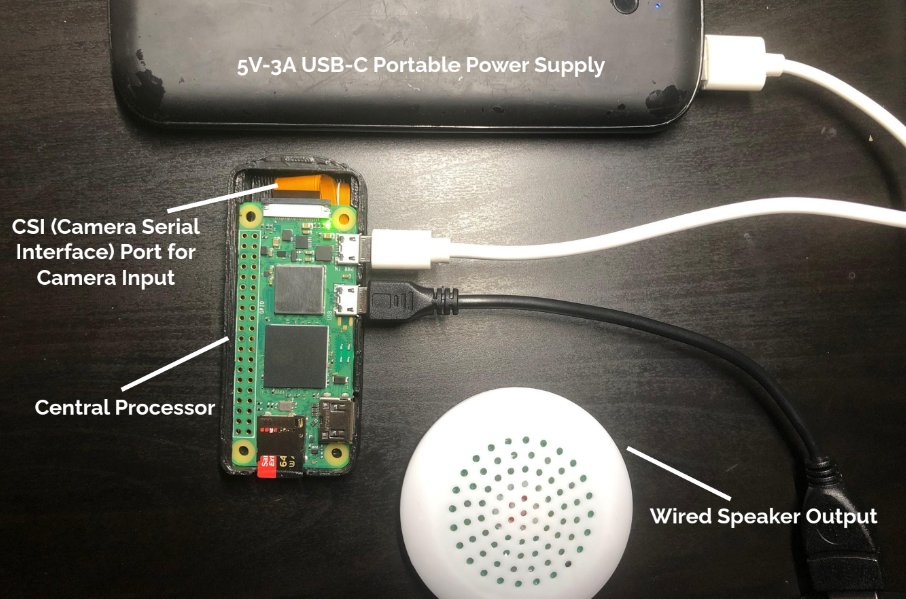
Figure 1. Physical diagram of sign-to-speech system (speaker output; microphone input is not included in this diagram)
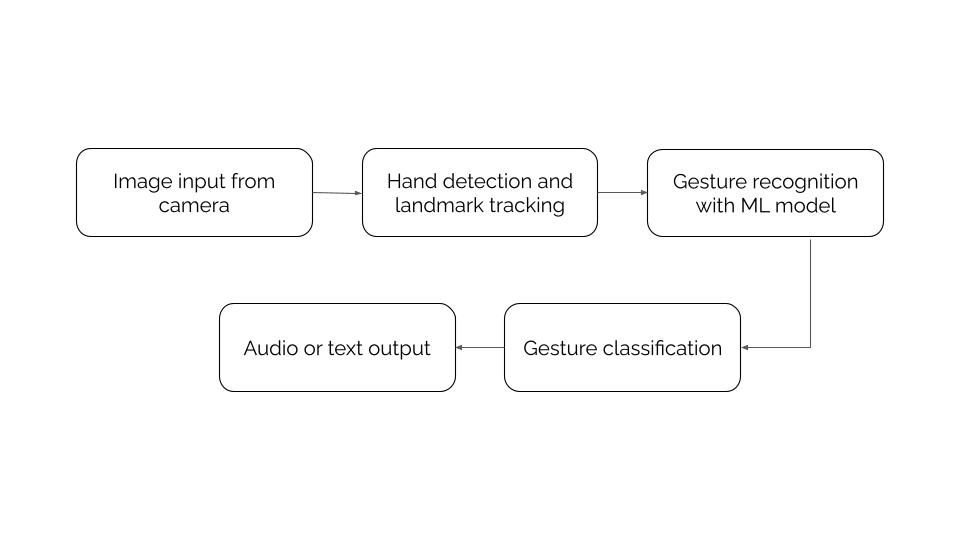
Figure 2. System flowchart/diagram of the sign-to-speech system
Sign-to-Speech System:
- Input: The camera (from the CSI slot) captures hand gestures and real-time video frames, working with computer vision libraries such as OpenCV
- Processor: Using a Raspberry Pi Zero 2 W, it acts as the microprocessing unit for the machine learning model to track hand gestures using frameworks such as MediaPipe, while also pre-processing the images with the appropiate colors and filters (BGR to RGB)
- Output: The classfied gesture is shown as text on a screen and/or generated as audio/speech through the speaker
Speech-to-Sign System:
- Input: The system listens and captures audio/speech through a microphone
- Preprocessing: Using the Speech Recognition and PyAudio libraries, a speech recognition engine, such as Google API, processes the raw signal, and allows for the capturing of live audio input from a microphone
- Output: After recognizing the spoken letter or word/phrase, the system selects the pre-recorded pictures of the letter sign(s), which are stored in a specific folder on the Raspberry Pi, and displays each of them through a preview window
Part Two: Design and Development Requirements
Materials and Cost
| Item Name | Retailer | Quantity | Price (CAD) |
|---|---|---|---|
| Raspberry Pi Zero 2 W Board | CanaKit | 1 | $21.95 |
| Raspberry Pi Camera Module - 8 Megapixel (V2) | CanaKit | 1 | $32.95 |
| Raspberry Pi Camera Cable (Standard - Mini 200mm) | CanaKit | 1 | $1.40 |
| Sandisk 64GB Extreme Pro Micro SDXC Memory Card Plus SD Adapter | Amazon (Sandisk) | 1 | $33.99 |
| USB OTG Cable (MicroUSB to USB A Socket) | CanaKit | 1 | $6.95 |
| Plugable USB Audio Adapter with 3.5mm Speaker, Headphone and Microphone Jack (USB Sound Card) | Amazon (Plugable) | 1 | $17.95 |
| Portable Mini Speaker | Amazon (Salalis) | 1 | $9.99 |
| Small Microphone | AliExpress | 1 | $8.00 |
| Miscellaneous craft supplies | Michaels | N/A | $12.50 |
| Total: | $145.68 |
Table 1.
3D Printed Models
- These 3D printed models, shown in Figure 4, were created and designed in Blender and Tinkercad to protect and encase the Raspberry Pi hardware and electronic components, utilizing 3D printing for its affordability and customization
- Is measured 32.90 mm (width) by 78.75 mm (length) by 12.01 mm (height), making it an ideal and suitable size to be worn on the wrist/arm or around the neck
- This design was adapted from Raspberry Pi Zero 2 W Camera Case on Cults 3D, which is licensed under CC BY 4.0, and was specifically modified to have rounder edges to eliminate any sharp corners or discomfort, further ensuring the safety and comfort for the user
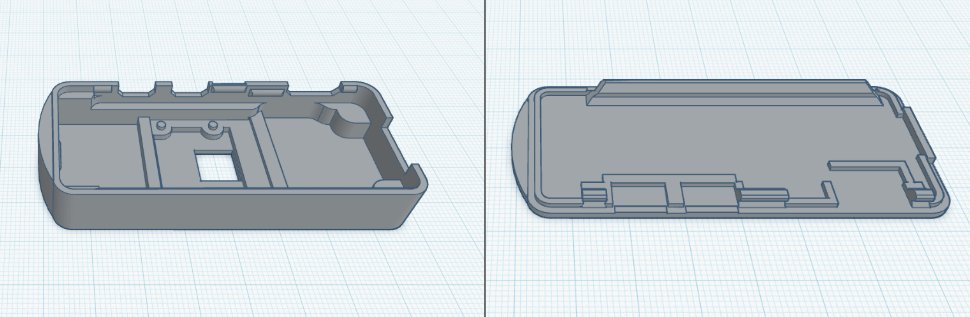
Figure 3. Two 3D printed models of the cover and case to contain the Raspberry Pi Zero 2 W and camera components.
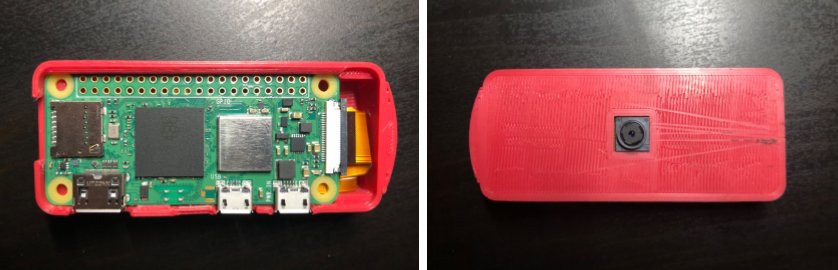
Figure 4. Physical model of the 3D printed case and components within.
Training the Model
Known to be a structured collection of data, a dataset is used to train and validate a machine learning model, and is composed of images and labels. To find the data to train my model, I downloaded images of the ASL alphabet from a well-known dataset on Kaggle, an online open source platform, which was readily available and used a total of approximately 20,000 images. I then annotated the images with Mediapipe's 21 3D landmarks that represent key points on the hand, allowing for more accuracy. Due to the limited processing power of the Raspberry Pi Zero 2 W, which only has 512 MB of RAM, I trained the model on Google Colab, which is a Jupyter notebook based runtime environment that allows you to run code entirely on the cloud without needing access to a powerful machine or a high speed internet access.
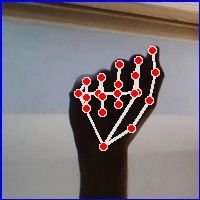
Figure 5. Sample image of the letter "A" with Mediapipe landmark annotations
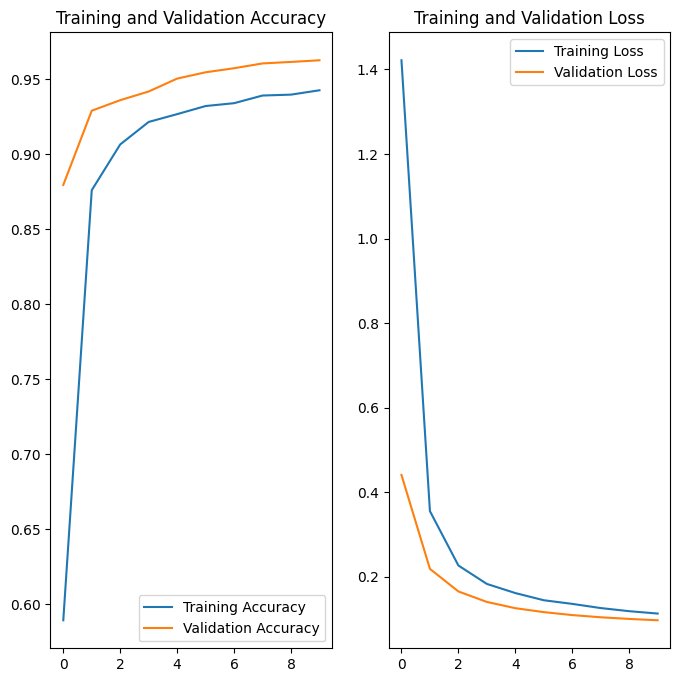
Figure 6. Graph of training and validation accuracy and loss over epochs
As shown by the graphs, the machine learning model had an average of approximately 95% accuracy and a 0.1 loss on the training and validation data, and performed exceptionally well on the unseen testing data with an accuracy of 96% and a loss of 0.1.
Deploying the Software/Model
After the model training had finished, I exported the trained model as a .task and .tflite file and then uploaded it to the Raspberry Pi. Using libraries such as OpenCV and Picamera to capture the live stream, I used Mediapipe to extract and track 21 hand landmarks, which then classifies the ASL letter sign into text and sends it to the pyttsx3 and espeak Text-to-Speech (TTS) engines, able to work completely offline and allows for a more humanoid female or male voice. Additionally, I have also added a separate script that allows for the signer to string the ASL letters into a word, which can be spelled out and displayed on the bottom of the preview window, rather than only displaying singular letters and making it easier to understand or communicate.
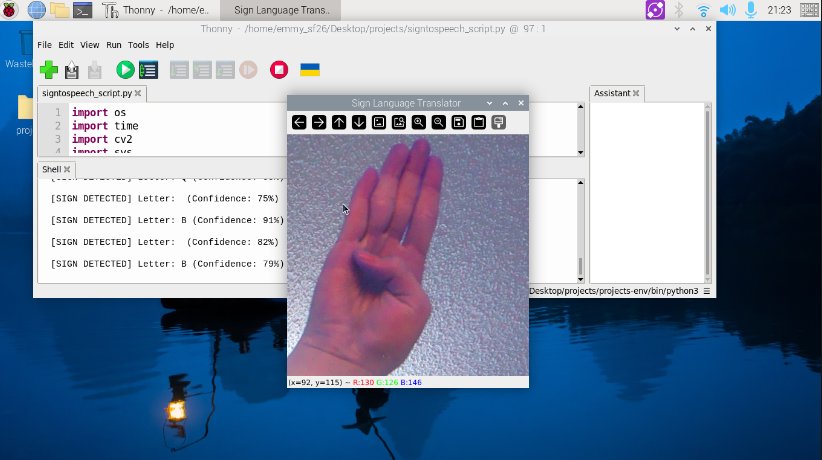
Figure 7. Screenshot/preview of the sign-to-speech system (letter B)
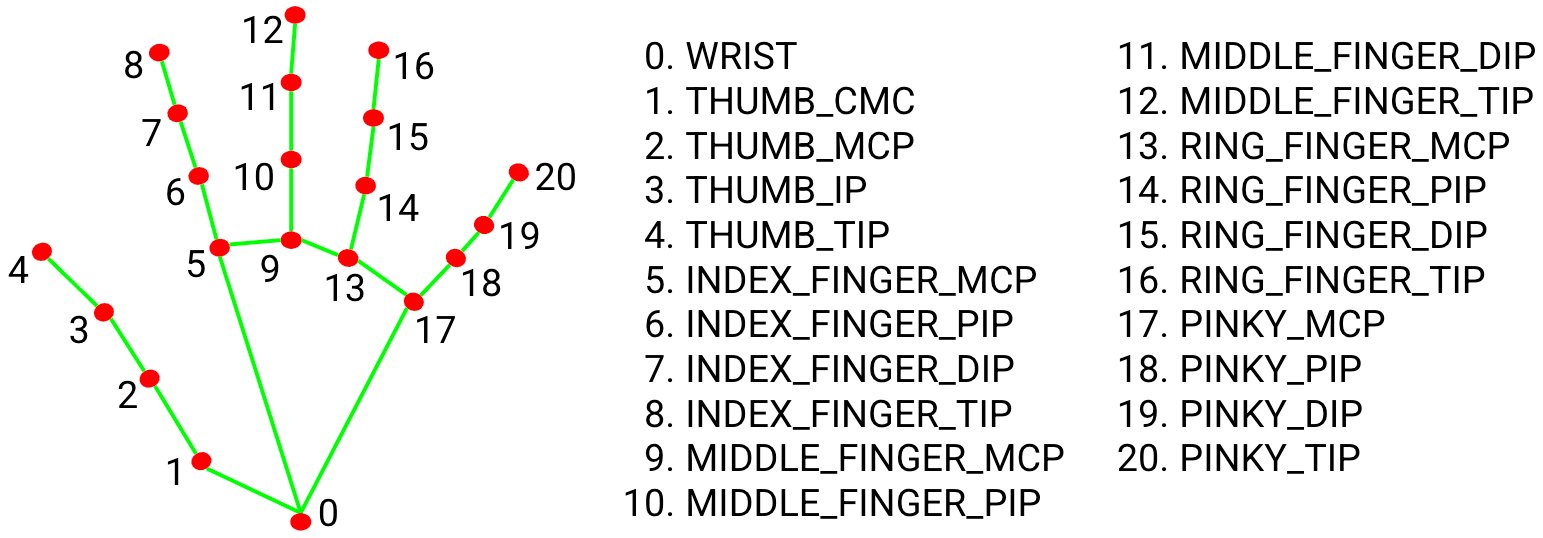
Figure 8. MediaPipe landmarks and skeleton diagram
Using the SpeechRecognition and PyAudio libraries, I have also added a speech-to-sign system that captures audio through a microphone and recognizes words or phrases. I created a folder with a picture of each ASL letter in the alphabet, and when the system recognizes the word, the system matches each letter to the pre-recorded pictures and displays the selected letters through a preview window, looping through each one.
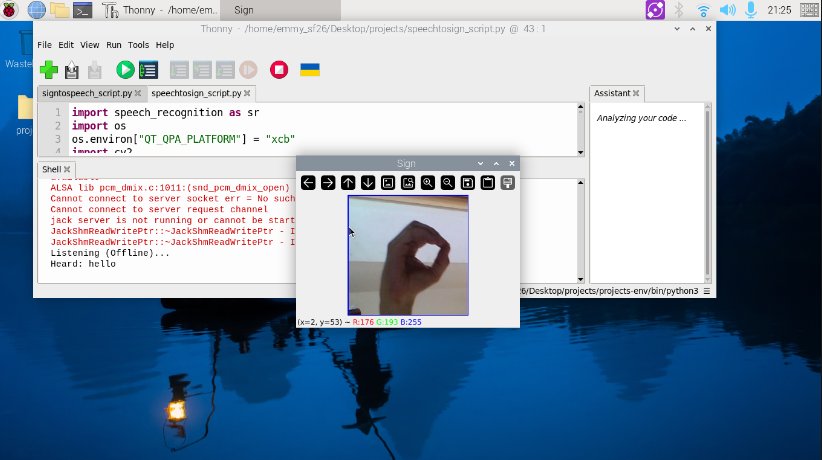
Figure 9. Screenshot/preview of the speech-to-sign system (the spoken word was "hello" and letter O is currently being shown)
Assembly & Design
Able to worn and alternated between a bracelet and necklace, the materials I used are water resistant and strong yet lightweight, while also allowing for different colors and playful patterns, making it ideal for children as well. Encased in a small 3D printed case, it allows for compactibility and easy movement, with a velcro strip that can withstand up to 5 pounds attached to the case to help easily alternate between different bracelet colors or patterns.
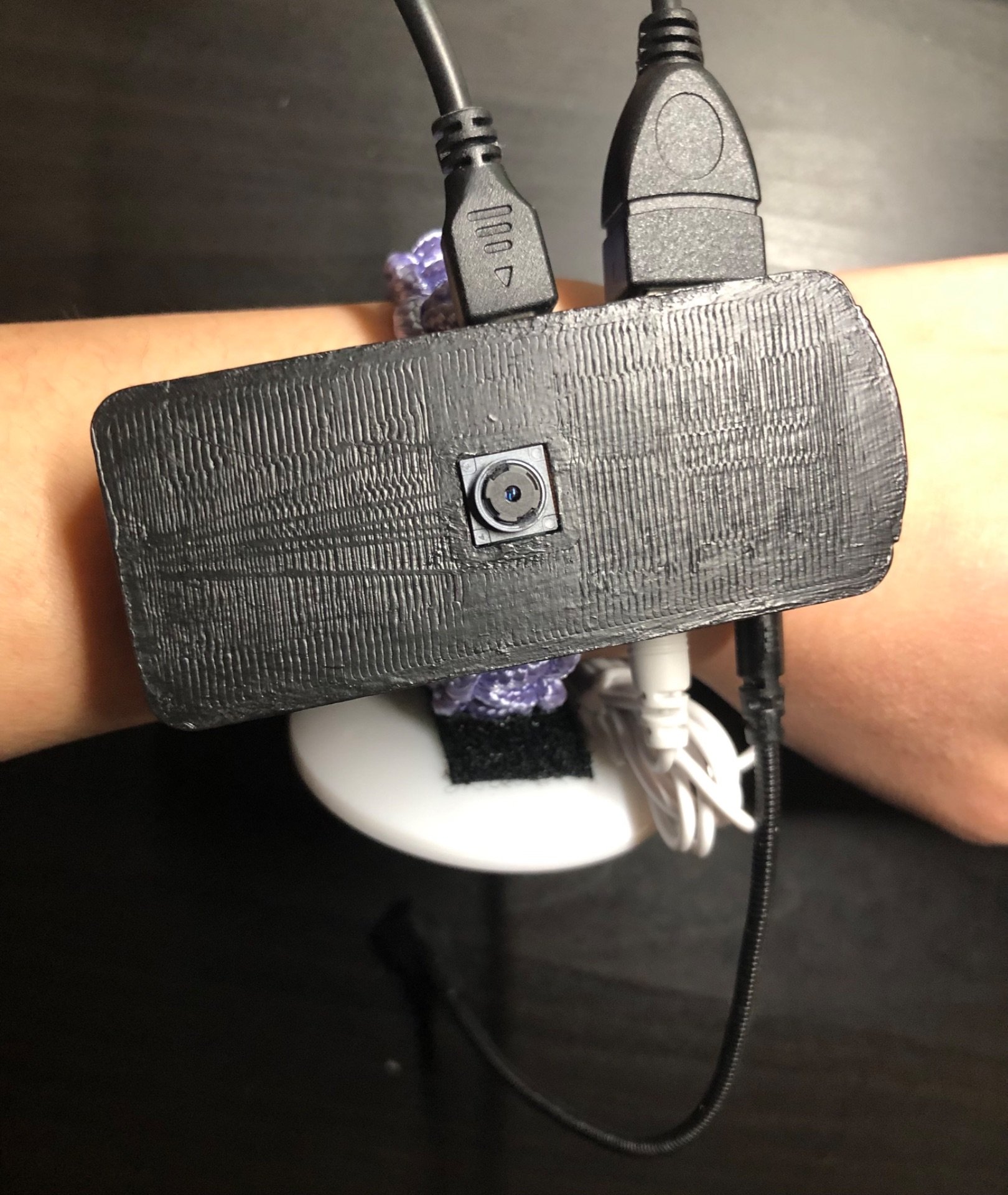
Figure 10. Preview of overall design
Source Code & Dataset
Kaggle Dataset: https://www.kaggle.com/datasets/grassknoted/asl-alphabet/data
Google Colab (for training the model): https://colab.research.google.com/drive/1Cj1ShmPuuSS0HQF9u-gpt8nmXa510SMn
I have not yet made the rest of my project code available.
Please note that an Artificial Intelligence powered tool, including Gemini and cs50.ai, was used to debug and partially assist me in my code. cs50.ai, an adaptation created by Harvard University to help students who are learning to code, uses a method called “rubber ducking”, which answers questions and explains code without directly telling students the answer, simulating a conversation with a teaching assistant.
Part Three: Testing and Evaluation
To test and evaluate its effectiveness, this project will be tested ten times in three trials, each with different conditions.
Trial 1: Has Ideal conditions with good lighting and simple background with little to no clutter
Trial 2: Has low lighting and cluttered background
Trial 3: Has a different user's hand (different hand size and skin tone)
Accuracy = Number of Correct Predictions / Total (10)
| Sign Tested | Trial 1 Accuracy | Trial 2 Accuracy | Trial 3 Accuracy | Average Confidence |
|---|---|---|---|---|
| Letter A | 10/10 = 100% | 8/10 = 80% | 9/10 = 90% | 80% |
| Letter B | 10/10 = 100% | 10/10 = 100% | 10/10 = 100% | 86% |
| Letter C | 9/10 = 90% | 8/10 = 80% | 9/10 = 90% | 80% |
| Letter D | 9/10 = 90% | 9/10 = 90% | 9/10 = 90% | 85% |
| Letter E | 9/10 = 90% | 10/10 = 100% | 10/10 = 100% | 82% |
| Letter F | 9/10 = 90% | 8/10 = 80% | 9/10 = 90% | 82% |
| Letter G | 9/10 = 90% | 8/10 = 80% | 9/10 = 90% | 76% |
| Letter H | 9/10 = 90% | 9/10 = 90% | 9/10 = 90% | 89% |
| Letter I | 10/10 = 100% | 10/10 = 100% | 10/10 = 100% | 92% |
| Letter J | 7/10 = 70% | 8/10 = 80% | 7/10 = 80% | 90% |
| Letter K | 9/10 = 90% | 9/10 = 90% | 9/10 = 90% | 90% |
| Letter L | 10/10 = 100% | 9/10 = 90% | 10/10 = 100% | 96% |
| Letter M | 9/10 = 90% | 9/10 = 90% | 9/10 = 90% | 61% |
| Letter N | 7/10 = 70% | 6/10 = 60% | 8/10 = 80% | 60% |
| Letter O | 9/10 = 90% | 8/10 = 80% | 10/10 = 100% | 90% |
| Letter P | 7/10 = 70% | 6/10 = 60% | 7/10 = 70% | 62% |
| Letter Q | 7/10 = 60% | 6/10 = 60% | 6/10 = 60% | 54% |
| Letter R | 10/10 = 100% | 10/10 = 100% | 10/10 = 100% | 90% |
| Letter S | 10/10 = 100% | 8/10 = 80% | 9/10 = 90% | 69% |
| Letter T | 9/10 = 90% | 8/10 = 80% | 9/10 = 90% | 70% |
| Letter U | 10/10 = 100% | 8/10 = 80% | 9/10 = 90% | 80% |
| Letter V | 9/10 = 90% | 9/10 = 90% | 10/10 = 100% | 72% |
| Letter W | 9/10 = 90% | 9/10 = 90% | 10/10 = 100% | 89% |
| Letter X | 8/10 = 80% | 8/10 = 80% | 9/10 = 90% | 61% |
| Letter Y | 10/10 = 100% | 9/10 = 90% | 9/10 = 90% | 95% |
| Letter Z | 9/10 = 90% | 8/10 = 80% | 9/10 = 90% | 51% |
Table 2.
Pausing for approximately 1 second between each letter, I have also set a small delay in the system to ensure it does not stutter or translate an already translated letter again. Instead, it waits for the next hand gesture after translating.
Participant/User Testing
To ensure the device correctly interprets hand gestures, the system will be tested with a variety of different hand sizes and skin tones. About 5-10 participants, most of whom were beginners or learning to sign, had been each assigned to a series of ASL letters, and tested if the device was comfortable to wear for extended periods, lightweight, and user-friendly in daily life. After testing, they were asked to fill out a survey. This testing and surveying for my project was conducted at my school in a supervised classroom.
Before the testing, all participants were required to fill out an Informed Consent Form, although this is a very low risk survey/project testing. All physical/online copies of the Informed Consent Form will be kept confidential in my physical logbook unless asked for during judging, and will not be uploaded onto the site. As stated in the forms, “all information on paper that could be used to identify individuals will be shredded at the end of the project.”
Procedure/Instructions:
- Place your hand in front of the camera with an open palm and ensure your hand is visible and in the frame.
- After the system detects your hand, (will classify your open hand as "None") begin signing your first assigned ASL letter(s).
- Pause between each letter to allow the system to accurately capture and recognize your hand gesture.
- After you finish signing your assigned ASL letters, fill out the survey and provide feedback or suggestions.
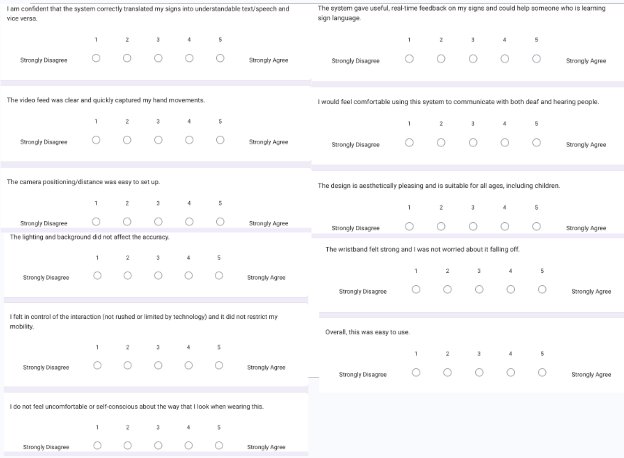
Figure 11. Survey given to participants (Google Form link: https://docs.google.com/forms/d/e/1FAIpQLScpp_7o2xu96jDRN_b8rYtK1dIGiv5ceaJcIKVBdoHi7qD2Xg/viewform?usp=dialog)
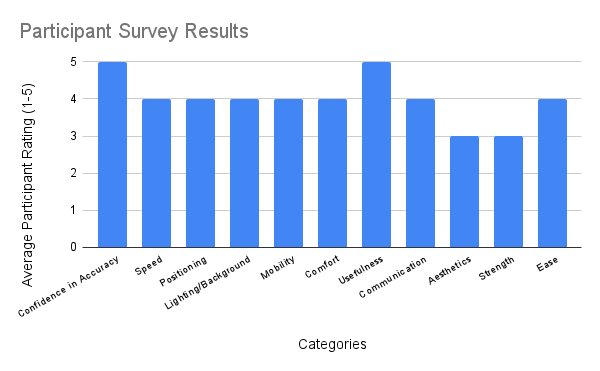
Figure 12. Average participant results/ratings (scale of 1-5) in 11 categories
Analysis
Improvements & Analysis
Initially, I had originally used a Raspberry Pi 4B model but later transitioned to a Raspberry Pi Zero 2 W due to its smaller and more compact size, and is more affordable, making it more ideal for this project. On the contrary, this prototype may be improved by the use of other smaller components and reduced wiring, such as removing the casing on the speaker or wires and soldering it directly onto the Raspberry Pi, to allow for maximum wearability and portability. Additionally, some other improvements may include increasing the speed of translation by using the AI Camera Model offered by Raspberry Pi, which offloads the computer vision proccesing from the Pi's CPU and enables real time detection on the module itself, rather than relying on the Pi. However, this camera is extremely expensive, and I had a limited budget with the goal of an affordable device, and therefore, I used a simple, cheaper camera module only for streaming, but requires significant CPU resources from the Pi. Moreover, another improvement may include the use of a larger dataset with different skin tones and hands, although further testing has shown that the system performs well and accurately with other user's hands or skin tones. While also allowing for different signing styles, the system should also have different options that can allow the user to choose the type of sign language (American Sign Language (ASL), British Sign Language (BSL), Chinese Sign Language (CSL), etc.), and should have several models trained in different languages.
Throughout the testing, the system performed exceptionally well in each of the different trials with different lighting, background, skin tones and hand sizes, and had an overall average of approximately 80-90% these trials. During model training, the model had performed with an accuracy of 90-96% and a loss of 0.1 on the datasets, and the graphs had shown that the model was not over-fitted, allowing it to perform well on unseen data, rather than merely memorizing the training data.
Overall, participants noted and observed that the device is comfortable, wearable and fairly accurate. Additionally, as individuals who are learning to sign, they also noted that the system gave good real time feedback.
Using Mediapipe to extract hand landmarks, tracking specific finger joints improved accuracy compared to analyzing the whole hand as a single shape or image. Additionally, although I added a slight delay to ensure the system does not repeat or stutter, the translation is fast enough for a natural conversation in real-time. However, the user must keep their hands within a specific field of view on the screen and ensure their hand is visible to the camera, while also holding the gesture for a moment to reduce motion blur, and may not catch rapid signing. When I was 20-30 centimeters away versus 60-80 centimeters away from the camera, the system was still able to accurately recognize and translate my letter sign, although further distances may lead to pixelation, making finger joints harder to track.
Under normal conditions and on a daily basis, wearing gloves would be uncomfortable and may have more restricted mobility With sensors to detect movements, a camera based approach may represent the signs more accurately, allowing them to see the location of the hand in relation to the body. Additionally, armbands or wristbands can help reduce sweating and can have a more aesthetically pleasing appearance, which can allow for both neutral and child-friendly designs suitable for all ages.
Reflection & Difficulties
Before I was even able to begin the actual code, I had difficulty with figuring out hardware issues, and had to do a lot more research due to the fact that I do not know much about this field yet. Additionally, I had issues with simply installing the required libraries and frameworks, and have spent ample time merely trying to figure it out. Since I am self-taught and am doing this individually, the most difficult part of this project was figuring out where to start, and I had to spend an immense amount of time researching, as I do not know very many people who have expertise in this field. For me, it was not the actual code that I was concerned about at the time, but rather figuring out how to prepare everything that is required, such as all the hardware components and installing all the needed tools so that this project has everything it needs when I begin working on the code and training the model.
Throughout this project, I learned a lot about the technical expertise and engineering behind artificial intelligence and how machine learning works, allowing me to understand how we can utilize this in our everyday lives. With real world applications and goals, machine learning requires analytical skills, the ability to build practical systems, and the understanding of the importance of high quality data, including analysis, designing, coding, debugging, testing, and maintaining. Taking more time to fully research the topic and design, I also learned to take a step back before moving and jumping directly into complex coding. Additionally, I learned how to print and design a 3D model to encase the hardware components, ranging from digital design to physical manufacturing of the project. Requiring patience and troubleshooting skills, I designed and modified parts that fit and snap together.
In retrospect, the advice I would give myself to ensure this project succeeds would be to not focus too long on one part of the project or research, and instead move on and come back later to add more details, allowing for maximum efficiency and giving myself more time. When stuck for a reasonable amount of time, I should also not hesitate to ask for help, and should reach out to others for support. Rather than stressing myself out over something I cannot control at the time, I should instead move on and work on a different section of the project, allowing myself to understand that every failed attempt is a learning opportunity and part of the process.
System Limitations
With potential biases, this project’s limitations include only working for alphabet letters, rather than continuous sign recognition, and is restricted to only American Sign Language (ASL). Often resulting in poorer performance, it can present significant biases regarding skin tone for individuals with darker skin, due to the fact that training datasets contain more images towards lighter skin tones, leading to lower accuracy. Additionally, the Raspberry Pi Zero 2 W model I chose may be slower with real-time applications, with a limited RAM of 512 MB. For others who rely on other modes of communication, this may be inaccessible to deaf individuals who have limited sign language skills, resulting in marginalization and communication obstacles. With several differences between the sign languages used in various countries and areas all around the world, this can lead to challenges for people who do not speak the same sign language to effectively communicate, and the system may struggle with different sign styles. For the letters J and Z, the signer must use motion to mimic the shape of each letter. With some similarities between ASL alphabet signs, such as A, E, M, N, and S, this makes it difficult to accurately distinguish between hand gestures for classification. Therefore, certain letters may not be represented accurately, due to the fact that the dataset I chose only had static images of these signs, including J and Z, which require motion. Furthermore, image or camera based methods often require good, consistent lighting and proper camera placements or distances while also requiring high processing power and memory. Although this project may help reduce reliance on human interpreters and provide more independence, it would be unable to correctly and meaningfully intepret sign language, due to the fact that it would need to be able to understand and empathize like a human, even with technological advancements. Currently, these devices can only translate a small portion of sign language with limited context, as human emotion and expression would be lost.
Future Applications & Expansions
Beyond simple static sign translation, some additional features this project could have are to be able to translate continuous streams of sign language and sentences, including facial expressions and body language, rather than static letters and hand signs. Currently allowing only American Sign Language (ASL) translation, it could also have the ability to translate multiple sign languages, such as British Sign Language (BSL), French Sign Language (LSF), Chinese Sign Language (CSL) and more, each with their own unique grammar. Helping users wanting to learn sign language, another addition could be to have interactive learning modules with quizzes and progress tracking. Additionally, this project in its current form only focuses on translating alphabet letters, and should therefore also begin to include and expand to other words and phrases. Allowing public places such as schools, hospitals and emergency services to have better accessiblity, this device should be incorporated more into our daily lives and education to ensure that deaf individuals feel less excluded and alone, as the use of sign language may be subject to social stigma, and may help change the perception of hearing people who view it as more inferior mode of communication. Although this project has the potential to help with real-world challenges, it should complement and reduce reliance on human interpreters, not replace them, due to the fact that AI and machine learning models still struggle with cultural nuances, sign grammar, and the human aspect of emotions.
Conclusion
The results of this project demonstrate:
- Project SongBird aims to serve as the first step to non-invasively solve real-world communication challenges and reduce reliance on human interpreters, allowing for more independence and fostering an inclusive society that allows for more seamless communication between deaf and hearing individuals, while also being affordable with a budget of $150
- Testing has shown that the prototype successfully translated sign language letters into text or speech, operated at greater than 90% accuracy, and was shown to be mostly comfortable, wearable and lightweight, which meet the initial design objectives, but may still benefit from the use of smaller components to ensure maximum compactness and wearability
- Although effective, the prototype was limited by its restricted processing power (RAM), making it slower in real time, and is only able to translate American Sign Language (ASL) alphabet letters, while also showing potential bias regarding skin tone and lighting
- To improve this design and prototype, future iterations should utilize a wider range of data when training the machine learning model, such as datasets with other sign languages and an extensive selection of images with different lighting and background for better effectiveness and accuracy
Citations
Rastgoo, R., Kiani K., Escalera S., Athitsos V., Sabokrou M. (2023, December 14). A survey on recent advances in Sign Language Production. Science Direct. https://doi.org/10.1016/j.eswa.2023.122846
Sanchez, C. E. (2025, May 28). Overcoming communication barriers to improve patient safety for American sign language users who are deaf or hard of hearing. Patient Safety. https://doi.org/10.33940/001c.138084
Abou-Abdallah, M., Lamyman, A. (2021, July 21). Exploring communication difficulties with deaf patients. Clinical medicine (London, England). https://doi.org/10.7861/clinmed.2021-0111
National Geographic Society. (2024, April 9). Sign Language. National Geographic Education. https://education.nationalgeographic.org/resource/sign-language/
Vishnu Priya, A K., Jayashri, S., Sivanjali, V., Sneha, V., ThamaraiSelvi, K. (2023, April 27). Two Way Sign Language for Deaf and Dumb using Deep Convolution Neural Network. International Journal for Research in Applied Science and Engineering Technology (IJRASET). https://doi.org/10.22214/ijraset.2023.51125
Umut, İ., Kumdereli, Ü. C. (2024, July 16). Novel Wearable System to Recognize Sign Language in Real Time. Multidisciplinary Digital Publishing Institute (MDPI). https://doi.org/10.3390/s24144613
Tim. (2023, February 16). Hand Recognition and Finger Identification with Raspberry Pi and OpenCV. Core Electronics. https://core-electronics.com.au/guides/hand-identification-raspberry-pi/
Alsharif, B., Alalwany, E., Ibrahim, A., Mahgoub, I., Ilyas, M. (2025, March 28). Real-time American Sign Language Interpretation using Deep Learning and Keypoint Tracking. Multidisciplinary Digital Publishing Institute (MDPI). https://doi.org/10.3390/s25072138
Rastgoo, R., Kiani K., Escalera S. (2020, August 10). Sign Language Recognition: A Deep Survey. Science Direct. https://doi.org/10.1016/j.eswa.2020.113794
Kang, H. S., & Exworthy, M. (2022, July 13). Wearing the Future - Wearables to Empower Users to Take Greater Responsibility for Their Health and Care: Scoping Review. JMIR MHealth and UHealth. https://doi.org/10.2196/35684
U.S. Department of Health and Human Services. (2021, October 29). American Sign Language. National Institute of Deafness and Other Communication Disorders (NIDCD). https://www.nidcd.nih.gov/health/american-sign-language
Adapted from Raspberry Pi Zero 2 W Camera Case (https://cults3d.com/en/3d-model/tool/raspberry-pi-zero-2-w-camera-case-heatsink-and-octopi-ready?srsltid=AfmBOoq2PD4RaVt6RyFLGtlEiXZj3kr-D3OytvQgLHfgUphchfvKSqey) by Love2HelpU (https://cults3d.com/en/users/Love2HelpU/3d-models) on Cults 3D, which is licensed under CC BY 4.0 (https://creativecommons.org/licenses/by/4.0/deed.en)
Akash. 2022. ASL Alphabet. Kaggle. https://www.kaggle.com/datasets/grassknoted/asl-alphabet/data
Banner image from Lighthouse Translations (https://www.lighthouseonline.com/blog-en/is-sign-language-universal/)
Acknowledgement
To those who have been there for me, even when the path ahead seemed dim, I would like to express my utmost appreciation and gratitude to the many people who have supported me throughout this project:
- My dad, unconditionally loving and forever supportive, for always being there for me no matter what and helping me aquire the materials I needed for my project!
- Ms. Kata Mayer, our Science Fair Coordinator, for providing her insight, sharing her experiences and knowledge of CYSF, and supervising and sponsoring my Science Fair club. This would not have been possible without you!
- Ms. Akhila Wolfe, my computer science teacher, for sharing her expertise and passion, and supporting me in any way she can!
- My friend Safia, for helping me by allowing me to use her 3D printer!
- My friends and peers who were eager to help me and participate in testing my prototype!
- My younger sisters, for supporting me throughout my journey!
- And last but not least, all the John G Diefenbaker students who were so eager to join my Science Fair club! I was so surprised and glad to see so many of our students and peers wanting to participate!
Truly the best people I could have in my life, I would also like to thank my family, friends, teachers, classmates and anyone else who have been supporting and encouraging me to keep going! Thank you so much!