
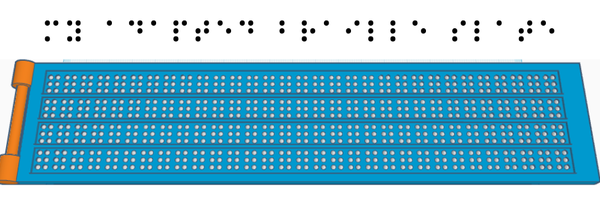
Advancing Handwritten Braille
Vivienne Skriver
R. T. Alderman School
Grade 8
Presentation
No video provided
Problem
Problem Statement
My project is to innovate a better way to hand write in braille. In our world today, blindness and deafness are some of the most accommodated disabilities. For example, braille is provided for important messages and crosswalk signalers often have automatic sound communicators. Similarly, closed captioning for movies and hearing aid research are adaptations for people with hearing impairment.
People who are blind are challenged to do many things sighted people take for granted. One of those things is writing by hand. There are lots of available writing technologies for the blind but handwriting something is much more difficult. When writing by hand, a braille slate is most commonly used. The design of a braille slate requires the user to write from right to left, in order for the written braille to be read left to right. This creates a unique challenge. So much has already been done to accommodate the visually impaired, why is it still a challenge to handwrite in their alphabet?
Think of how often you handwrite. For example birthday cards, notes, grocery lists, thank you cards, if you want to personalize anything you are going to handwrite it. This is why I am trying to create a method of writing braille that is better, more efficient and easier to use and learn.
Background Research
Braille Braille is a form of writing or code used by people who are blind or seeing impaired. It allows people with limited sight to be able to read and write by touch. Braille uses a system of raised dots to spell out words. It is not a language like sign language. Sign language has its own grammar and cadence whereas braille is just a different form of writing the characters of a language, like a code. Braille is available in many languages including French, Mandarin and Taiwanese. There are three levels of complexity when using braille:
- Level one - spelling out each individual letter of every word
- Level two - using contractions or shortening words to only consonants
- Level three - using your own shorthand and contractions. Most seeing-impaired people will write in level two or three braille.
Writing Braille Commonly, when writing in braille, you use a technology like a Perkins brailler which acts similarly to a typewriter. But to write by hand you will probably use a slate and stylus.
A slate and stylus works by inserting the paper, usually card stock or thicker paper, into the slate and swinging the guide over to close the slate and pin the paper inside. Then using the stylus and starting at the right, you will punch in each dot moving to the left. Then when done you remove the paper and turn it over to feel and read what you have written.
When punching the dots into the paper you are on the back of the page. This means that if you want to read the characters left to right, you need to punch them right to left because you are writing on the back. This also means that the characters are mirrored on the back. This can be confusing and is a hard technique to learn.
What you read
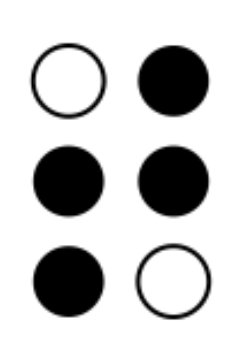 What you write
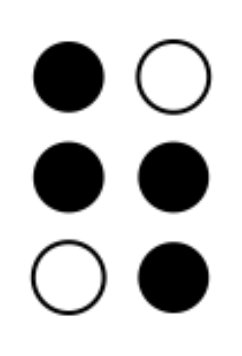 Braille T; https://thenounproject.com/icon/braille-alphabet-t-1578551/
 Pocket brailler; https://www.aph.org/product/pocket-braille-slate-pins-up-heavyweight-metal-slotted-for-labeling-tape-with-large-handle-stylus/
 Braille alphabet; https://en.wikipedia.org/wiki/Braille
 Braille contractions; https://brailleawards.com/different-types-of-braille/
Link to pdf of all braille symbols and level 2 contractions
https://www.brailleauthority.org/ueb/symbols_list.pdf
Braille contractions; https://brailleawards.com/different-types-of-braille/
Link to pdf of all braille symbols and level 2 contractions
https://www.brailleauthority.org/ueb/symbols_list.pdf
History of Braille Braille was created by a man named Louis Braille. He lived from 1809 to 1852 in France. He was blinded at age three by an accident that hurt one of his eyes and then infected the other, and as a result, he lost total sight. At age 10, he began to attend the only school for the blind in the country, the Royal Institute for Blind Youth. There he learned to read embossed letters, which are raised letters. This was a very difficult system to use and reading was a challenge because the letters were quite large and often required two hands to feel them. Then Louis was introduced to night writing. Night writing was used in the military as a way to read without a light so as not to betray your position. However, it had problems such as no punctuation or numbers, and you could only write to those who understood the system because it was designed to use the sounds of words, not the actual letters like braille uses. Louis Braille knew they needed a better system.
Over the course of five years, he designed what is now braille. For his alphabet, he used a two by three grid of raised dots. He decided that letters A through J and numbers 0 to 9 would use only the first two rows (1,2,4,5) of his grid, then letters K through T used the first dot on the bottom row (4), and letters U through Z used both dots on the bottom row (3,6). Since Louis Braille spoke French, his alphabet included accented letters but when using English they are not included in the braille alphabet. Traditionally French doesn't include the letter W, so to accommodate English it was later included and uses the bottom dot on the right (6). While this system is now the national alphabet of the blind and seeing impaired, it wasn’t until 1854 that it was officially recognized, two years after Louis Braille’s death.
He also derived another system called decapoint or ten-dot writing; it is a less popular method but has its advantages. Decapoint uses a grid of ten dots vertically. Decapoint makes the raised dots appear to look like regular letters so a seeing person with no knowledge of braille can read something written by a blind person. Decapoint was created to address the problem that the children at the Institute could receive letters from their parents but not write back. Letters could be read to them but they could not write to their parents because there was no one there to transcribe their letters from braille into English or French script.
Louis Braille attended the Royal Institute for Blind Youth and never left. Originally he was a student but, as he grew older, he accepted a position as a teacher. He stayed at the Institute until his death with occasional trips back to his home in Coupvray. At the school, he primarily taught geography and grammar but he also taught history, arithmetic and algebra.
After inventing the braille system, Louis expanded it to include mathematical symbols and also derived a form of written music for the blind so they could read and compose music. During Louis' time at the Institute, he revolutionized the life of a blind person. His many accomplishments have shaped our society so that we can appreciate and accommodate the blind if we take the effort.
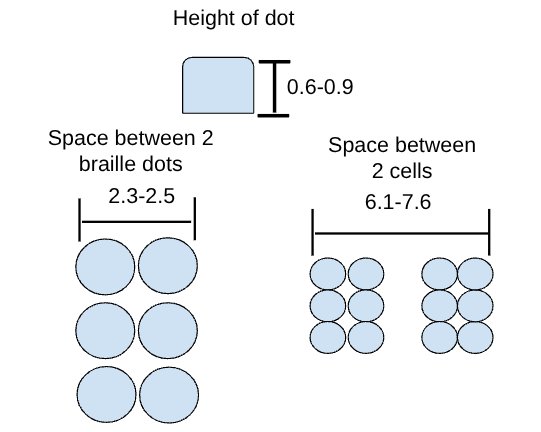
 Diagram of a cell; https://brailleworks.com/reading-and-writing-braille/
Braille dot and cell standards
Height of dot: 0.6mm to 0.9mm
Dimension of cell: 2.3mm to 2.5mm
Space between two cells: 6.1mm to 7.6mm
 Table of braille dot standards; https://brailleauthority.org/size-and-spacing-braille-characters
|
 |
|---|
| Technologies for writing in braille | Explanation |
|---|---|
| Braille embosser (printer) | A professional grade printer that indents a paper with braille characters. |
| Slate and stylus | A method of handwriting in braille where you write right to left and indent the paper by hand. |
| Speech to text | Typing on a computer by speaking the words you want written. |
| Braillewriter (Perkins brailler) | Small machine that types braille characters into paper. It works very similarly to a typewriter. A standard brailler has 9 keys: delete, space, enter and 6 keys. The 6 keys represent the dots in a braille cell. You hold down the keys that would form a letter and it imprints it on the page. |
| Braille keyboard | Keyboard keys with printed braille. |
| Peg slate | Works by having a small sheet of plastic with small pieces that slide back and forth. On one side you press in the dots that you want to show up on the other side then you flip the slate over and can read the dots. This is used mostly for learning and practicing braille. It is rarely used for extended messages. |
| Refreshable braille display | As you read a web page, the dots get pushed up for the letters and constantly refreshes the page as you scroll down. It is usually on the bottom of a standard keyboard or is provided on a mountbatten brailler. |
| Mountbatten Brailler | Electronic braille typewriter. Similar to the Perkins brailler but more advanced. |
| Braille note taker (electronic) | Works similar to the refreshable braille display except the user can store their personal notes and can come back to them later. |
Perkins Brailler Perkins brailler; https://brailler.perkins.org/pages/unimanual-perkins-brailler
Mountbatten Brailler
 Mountbatten brailler; https://www.computinghistory.org.uk/det/43462/Mountbatten-Brailler/
Method
Prototype Ideas
1.
 2.
2.
 3.
3.
 4.
4.
Explanation of Prototype
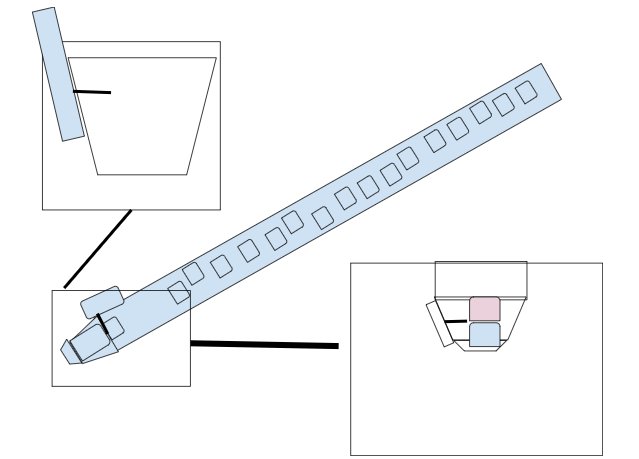
- The first prototype is designed to work like a pen, inside it stores filament to make the raised dots in braille. The button when pushed separates the two dots and then pushes them on the paper.
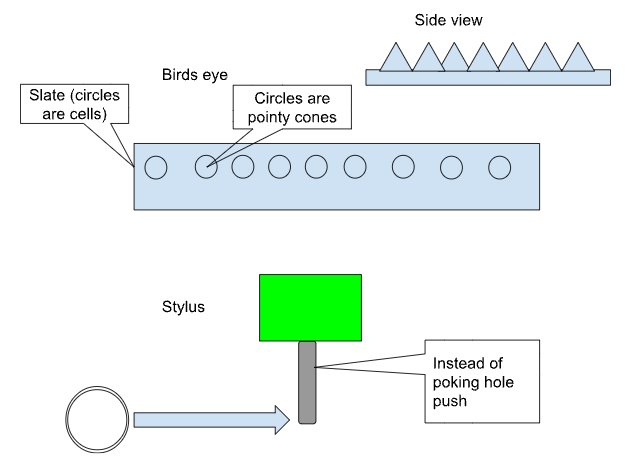
- The second design is similar to a real braille slate but instead of pushing in the dots, you impress the paper on the raised points. This works by pushing the paper around the point to create a braille dot.
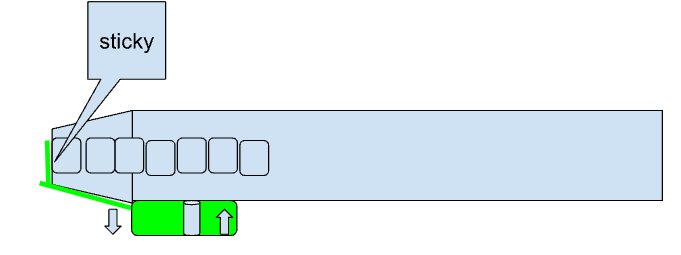
- The third design is also made with a pen in mind but is less complicated than the first design. It purely holds the filament until needed.
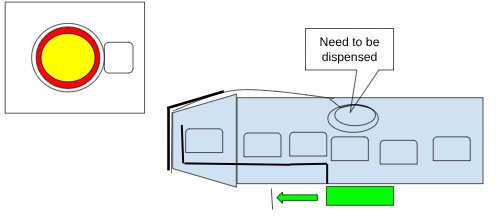
- The fourth design is the most complicated. It has a roll of adhesive on one side that the filament falls on to, then the circle cuts the adhesive and places it on the page.
Exploration
Currently, there are many writing technologies for the blind but very little research has gone into handwriting. Using a slate and stylus is a method that Louis Braille used to devise his coded alphabet. Since then braille writing hasn't been drastically altered and the problem of mirrored writing hasn't been fixed. Therefore my braille slate is unique because it solves the mirrored writing problem.
Problem Statement
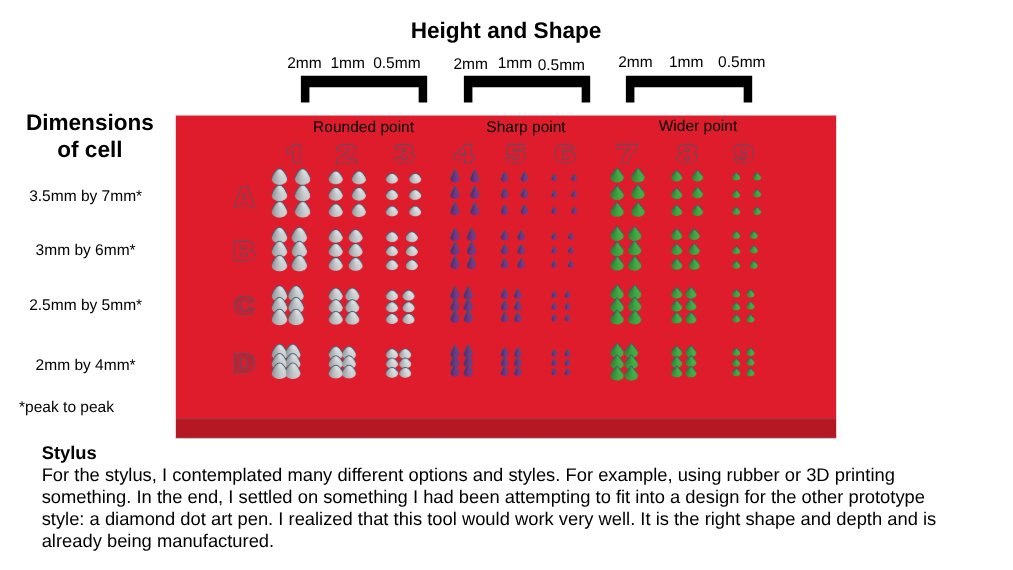
I chose to expand on prototype number two because it was the simplest design and most likely to work. It was also the most similar to the traditional braille slate which has been proven to be effective. In designing the prototype, I realized I needed to know what size, shape of the dots and how much space is needed between each dot. So I decided to include an experiment to determine which combination will work best.
Testable Questions
If I change the size, shape and space between the braille cells of my design, I will be able to determine which combination is the easiest to feel without piercing the page.
Hypothesis
If I indent the paper with different size, shape and spaced braille dots, then cell “B2” will be the easiest to feel, decipher and not pierce through the paper. This is because the shape has the most rounded point so it won’t pierce as much. It has an average height of 1mm so it will indent but not pierce. The cell dots are close together and should create an imprint similar to the size of a regular braille cell and the dots can still be differentiated.
Diagram of Test Braille Slate
 https://www.amazon.ca/Sopcone-Painting-Accessories-Including-Transparent/dp/B08NVQC6HP/ref=zg_bs_g_23542572011_d_sccl_5/131-3812893-2114501?psc=1
Procedure
I will create 5 test samples. Each sample will have 36 full cells that are all different shapes and sizes that are from my test slate. I will also make a control sample to show the volunteers what a standard cell would feel like (from a traditional slate). This will also be done in the same configuration as the test samples from the test slate. Each sample will be given to the volunteer after they inspect the control. I will ask them to feel the entire test sample for each trial and tell me which cell is their preference. This preference will be based on clarity and distinction of dots and cells as well as the size of cell (could the cell be comfortably felt under a single fingertip?). This will be completed 5 times with 9 separate people. Each trial will be given in a different order.
Variables
Manipulated: The height of the dot, the shape of the dot, and the amount of space between each dot
Responding: Which cell creates the most defined indentation without piercing the paper
Controlled: Paper, stylus, slate, samples
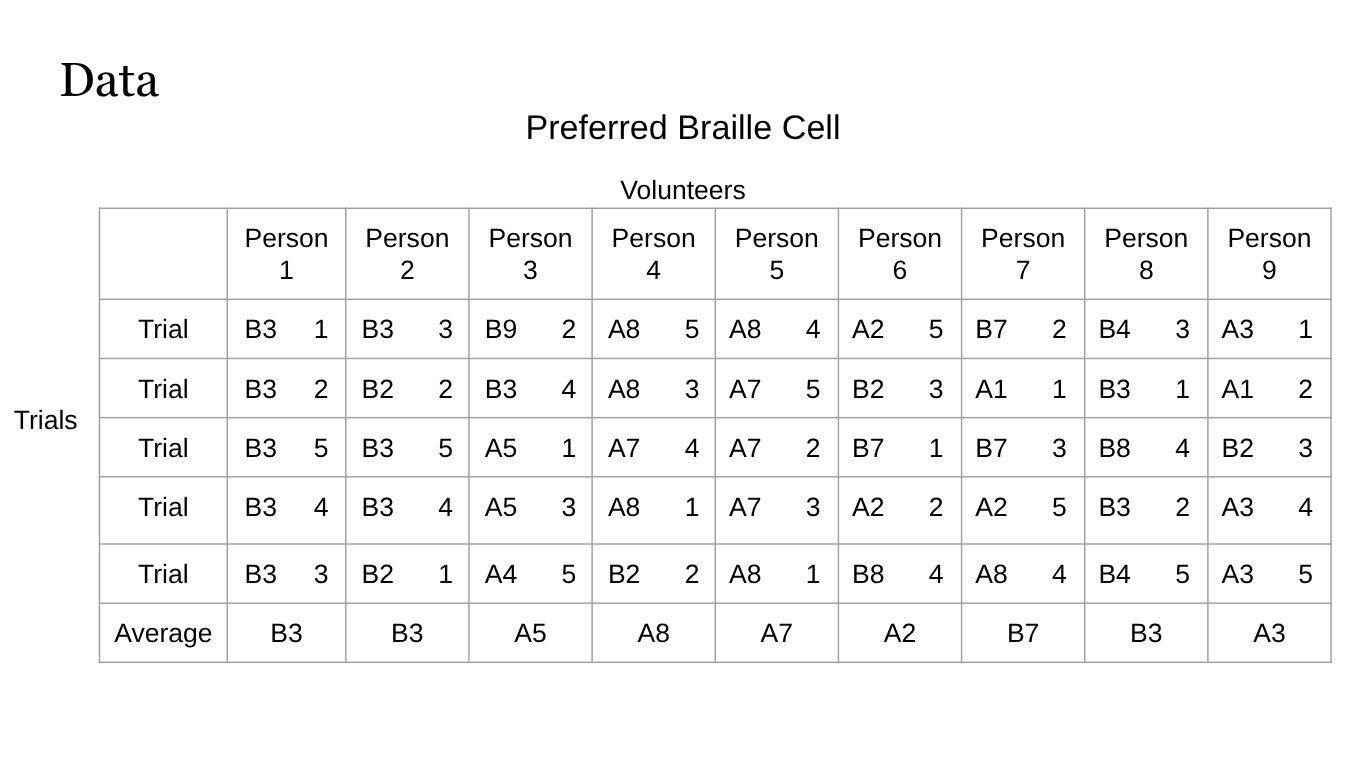
I will give the trials in a different order each time. If I give them in order (1-5) for every person then they most likely would have been bored or set on one preference by trial 5. This way if one of the trials is different in some way it is more likely to be noticed if it is presented in a different order then if it's presented in a standard order. The number beside each cell is the order the trials occurred in.
Data
Analysis
Analysis of Experiment
From the data I collected in my test, I can say that B3 was the cell that fit the requirements the best. This was shown in a few different aspects. The first one being that overall when indented it appeared most similar to a standard braille cell. B3 is around the same size as a standard cell and the dots it created were obviously raised unlike some of the other shapes and sizes. B3 also didn’t puncture the paper as much as some other cells did. These reasons were most likely why the volunteers in the test found B3 to be the most preferable. Looking at my data, you can see that when averaged B3 was identified by 3 volunteers as their preferred cell and in total B3 appeared 11 times or 30.55% of the time. Whereas the other preferences appeared considerably less frequently. I have decided to use B3 in my final product because the testers averaged choosing B3 as the cell that was the easiest to discern because of reasons already mentioned.
Final Analysis
Overall, my experiment accomplished the objective. My adapted braille slate solves the problem of mirrored writing. Although the quality of the characters the slate produces isn't as clean as those made with other existing technology it solved the main dilemma. The slate can continue to be improved and refined until it works to the same degree. Teaching the use of my slate will become much easier and tasks involving handwriting will become simpler.
Final Product Analysis
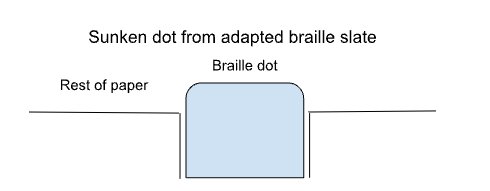
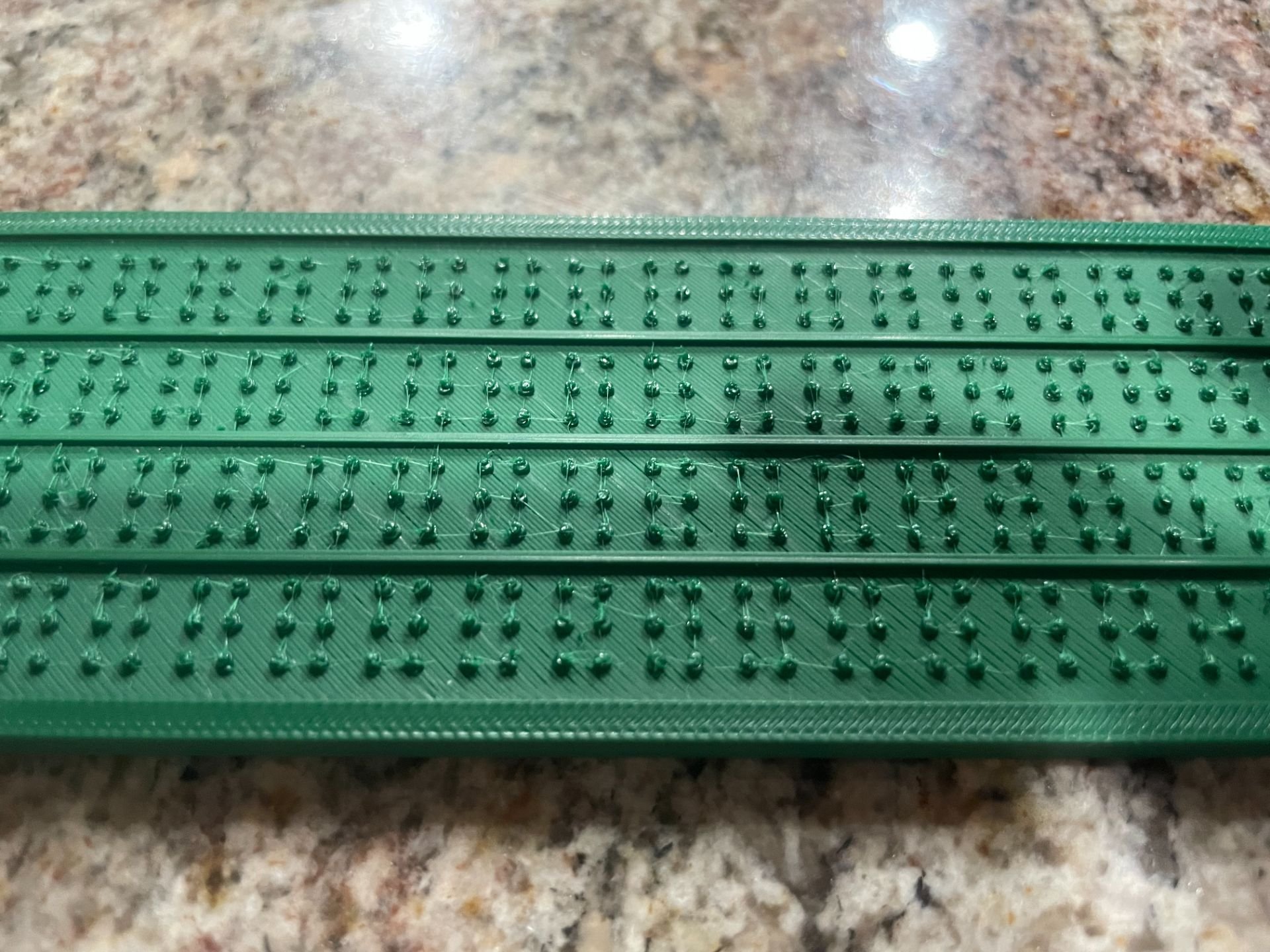
After using my final adapted braille slate I can see that it has some strengths and some weaknesses. The main accomplishment of my adapted slate is that it solves the mirrored writing problem. You can efficiently write from the left to the right instead of writing from the right. Some other strengths are that all the characters when written are legible to the eye, although feeling by touch is more difficult. One of the main challenges of my slate, that I had not accounted for, is that the paper around the dot tends to cave. This results in the dots being almost level to the page. Even though this is a problem I think that it could be overcome at a different time with a slightly different design. All in all I would say my design was successful in accomplishing the main objective. Though it could use some alterations and refinements it definitely has potential to solve the problem of mirrored writing.
Computer Image of Adapted Braille Slate

 Adapted Braille Slate
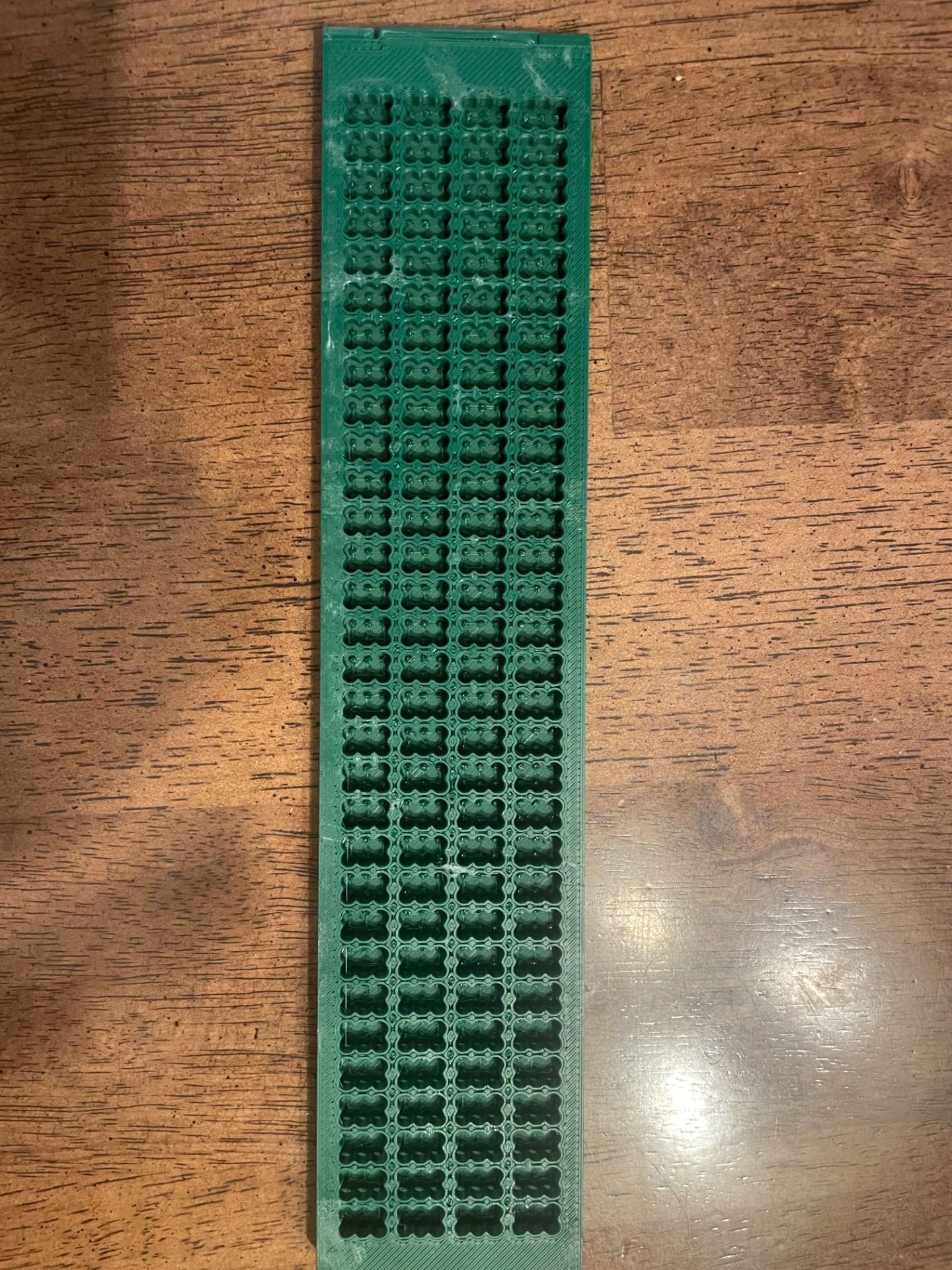 Close-up of Adapted Braille Slate
Conclusion
Conclusion
This test helped me determine which dot was the best shape and height and how far apart the dots in a cell should be. In the test I conducted, B3 was the cell that fit the requirements the best. My hypothesis was inaccurate. Originally I hypothesized B2 which is very close to B3. B3 is only slightly larger which can be beneficial. For my slate, if the dots are too close together, then when one braille dot is indented, it can make the others around it will also indent slightly. This could create confusion.
B3 uses the roundest point, has a height of 0.5mm and the dots in the cell are 3mm by 6mm (peak to peak). This is slightly larger than standard but is necessary for there to be enough room for the stylus to fit around the dot and so that only one dot indents. With this knowledge, I can build a final braille slate using my reverse design and a hinged guide.
In my experiment, we found that the guide was important because, when the paper was placed over the slate, the guide provided direction for where to press the dots. The final design will have four rows of B3 braille dots and will be equipped with a guide.
Real World Applications
My project can greatly improve the real world. Writing by hand is very common and happens on a daily basis. Yet for seeing impaired people, this can be challenging. To use a traditional braille slate they have to write from right to left while reading braille left to right. This forces the characters they write to be reversed of how they read them. There are no other languages that require this. Using my adapted braille slate, writing mirrored will no longer be a problem. Learning braille can be easier and faster.
Being visually impaired can be very hard in a world that heavily relies on sight. If you no longer have to learn a complicated mirrored writing system to write a simple grocery list or explain an answer in school then you will have one less thing to master. My braille slate can and will do this. It is still an incredibly simple design yet it can be used to write left to right instead of the traditional right to left. My adapted braille slate will greatly improve the life of a seeing impaired person because it simplifies the unnecessarily complicated task of writing a note.
Citations
Citations
Accent signage raster® braille pen. Johnson Plastics Plus. (n.d.). https://www.jpplus.com/accent-signage-raster-braille-pen?srsltid=AfmBOooiOv8LkTHfdQLcbc7y9J6uy_9NMO4wnLiI_kqUcLonV9NM4zQ7
The American Foundation for the Blind. (n.d.-b). Braille. The American Foundation for the Blind. https://afb.org/blindness-and-low-vision/braille
Appendix 1 page 1 appendix 1 braille symbols and indicators braille characters. BRAILLE SYMBOLS AND INDICATORS. (n.d.). https://www.brailleauthority.org/ueb/symbols_list.pdf
Avalis. (2026). Raised Text & Braille Requirements. Avalis Wayfinding Solutions. https://www.avalisway.com/resources/ada-resources/ada-raised-text-braille-requirements/
Blindness (vision impairment): Types, causes and treatment. Cleveland Clinic. (2025, October 6). https://my.clevelandclinic.org/health/diseases/24446-blindness
Braille alphabet. Braille Works. (2025, July 16). https://brailleworks.com/braille-resources/braille-alphabet/
Braille and tactile signage. Reprodux. (2025, June 20). https://www.reprodux.com/braille-and-tactile-signage/
Braille Authority of North America. (n.d.). Size and spacing of Braille characters. Size and Spacing of Braille Characters |
Braille Authority of North America. https://brailleauthority.org/size-and-spacing-braille-characters
Braille Literacy Canada: Resources for Educators. Braille Literacy Canada | Resources for educators. (2026). https://www.brailleliteracycanada.ca/en/resources/educators
Braille: Deciphering the code. BrailleBug. (2024, May 3). https://braillebug.org/braille/braille-deciphering/
Braillo are the only embossers that meet all braille authority dot height & spacing standards. Braillo Braille Printers and
Braille Embossers. (2021, September 2). https://braillo.com/braille-dot-height-standards/
Britannica (Ed.). (2015). Moon type | Writing System | britannica. Britannica. https://www.britannica.com/topic/Moon-type
Britannica (Ed.). (2026). Braille | history\, inventor\, description\, & facts | britannica. Britannica. https://www.britannica.com/topic/Braille-writing-system
Britannica (Ed.). (n.d.-a). Braille | history\, inventor\, description\, & facts | britannica. Britannica. https://www.britannica.com/topic/Braille-writing-system
Britannica (Ed.). (n.d.-b). Louis Braille | Invention\, facts\, & death | britannica. Britanica. https://www.britannica.com/biography/Louis-Braille
The Centre for Computing History. Centre For Computing History. (n.d.). https://www.computinghistory.org.uk/det/43462/Mountbatten-Brailler/
CNIB offices. CNIB. (2026). https://www.cnib.ca/en/office-locations?field_location_region=A+CNIB
Dearing, M. (2024, July 3). Accommodations you can benefit from when you have hearing loss. My Hearing Centers. https://myhearingcenters.com/blog/accommodations-for-hearing-loss-benefits/
Fleming\, P. (2021\, February 24). Different types of Braille: Braille awards. Braille Awards | “There is a wonder in reading
Braille that the sighted will never know: to touch words and have them touch you back.” https://brailleawards.com/different-types-of-braille/
Frith, M. (2017). Who was Louis Braille? Provincial Resource Centre for the Visually Impaired. How to read and write Braille. Department for the Blind. (2025, September 5). https://blind.iowa.gov/resources-support/how-read-and-write-braille
Jenkinson, G. P., Conn, A. T., & Tzemanaki , A. (2024, September 10). September: Braille-tip pen: News and features:
University of Bristol. September: Braille-tip pen | News and features | University of Bristol. https://www.bristol.ac.uk/news/2024/september/braille-tip-pen.html
Paths to Literacy. (2026, February 23). Tools for writing Braille. https://www.pathstoliteracy.org/tools-writing-braille/
Pocket Braille Slate (pins up), heavyweight metal, slotted for labeling tape, with large handle stylus. American Printing House. (2026). https://www.aph.org/product/pocket-braille-slate-pins-up-heavyweight-metal-slotted-for-labeling-tape-with-large-handle-stylus/
Refreshable Braille displays. The American Foundation for the Blind. (n.d.-a). https://afb.org/node/16207/refreshable-braille-displays
Tools for writing for children who are blind or low vision. ConnectCenter. (2025, February 24). https://aphconnectcenter.org/familyconnect/education/ecc/assistive-technology/tools-for-writing/
Unimanual Perkins Brailler. Perkins Brailler Store. (2026). https://brailler.perkins.org/pages/unimanual-perkins-brailler
Wikimedia Foundation. (2025, December 17). Decapoint. Wikipedia. https://en.wikipedia.org/wiki/Decapoint
Wikimedia Foundation. (2026a, February 10). Braille. Wikipedia. https://en.wikipedia.org/wiki/Braille
Wikimedia Foundation. (2026b, February 21). Night writing. Wikipedia. https://en.wikipedia.org/wiki/Night_writing
YouTube. (2021). A Day in the Life of a Person Who is Blind or Visually Impaired. YouTube. https://www.youtube.com/watch?v=L-AUf0Ky1GM
YouTube. (2025). How To Make: Box Hinge From SCRATCH Using Tinkercad For 3D Printing. YouTube. https://www.youtube.com/watch?v=cisdY-8hQPI
YouTube. (n.d.). Glue-Dots in Diamond Painting . YouTube. https://www.youtube.com/watch?v=rEIad0LCiEU
Acknowledgement
I would like to thank my parents for helping me navigate 3D printing, helping me edit my project and all the encouragement. I would also like to thank my CYSF coordinator for helping and supporting me with my project. And I would also like to thank Ms. Beatty for her support and encouragement. And I would like to thank Mr. Baranec for teaching and supporting me in 3D printing. And finally to CYSF for giving me this amazing opportunity.