
Mental Pressure Checker
Ting Chi Cheng
Branton School
Grade 9
Presentation
Problem
Problem
Pressure comes from many things, especially from responsibilities that take half of our life time. People with higher responsibilities will often experience higher levels of mental health pressure. For example, having a large amount of homework, unfinishable chores and many deadlines coming up, are all the reasons that cause pressure. Each person’s pressure is created by different things. The more pressure you get, the more stress you feel, pressure can also make people very emotional and many sickness. But it could get worse. When we are experiencing stress our brain will send in some stress hormones in our body, which leads to many different issues, such as mental health problems, making people very emotional, digestive issues, headaches (tension headaches), heart disease, and even increased the risk of getting certain types of cancer.
Digestive issues
The gut and brain are connected in your body. When you feel stressed, your brain will send signals to your digestive system. This can cause symptoms like stomach pain, indigestion, nausea, diarrhea, constipation, and bloating. In some cases, stress can worsen symptoms of bowel disease like Irritable Bowel Syndrome says by Dr. Torosian. These symptoms are your body’s way of telling you to have too much stress. Irritable Bowel Syndrome (IBS) is a sickness that causes you to keep having diarrhea, bloating, stomach pain, and constipation, all of these symptoms will keep repeating for a period of time.
Heart disease
When you feel stressed, scared or nervous, your brain sends a message to your whole body. The normal reaction is heart beating faster and breathing faster or a shortness of breath. When the stress hormones are released, they will tighten your blood vessels, which causes your blood pressure to get higher. Stress can also cause extra sugar in our bloodstream which causes high blood sugar. Stress also produces more stomach acid which can lead to heartburn. All of this will increase the risk of getting a heart attack or stroke.
Cancer
Stress doesn’t directly cause cancer, so people might not notice it or even care about it. But stress turns out to be the factor of causing slower or weakens your immune system. The immune system is a protector from your body to protect you from bacteria and other harmful organisms. But if the immune system weakens, it won’t have the ability to notice the cancer faster and to destroy it before it expands, it will also have difficulty trying to stop it from growing and spreading. Stress can also help cancer spread easier. Many people when they feel stressed they will smoke, drink alcohol, have not enough sleep and even take drugs. All of those will also increase the risk of getting cancer. The most likely stress will increase risk of getting breast cancer, prostate cancer, and colorectal cancer.
That is why I want to create a small tool/ survey to help people understand their pressure level and stress. By knowing their own pressure level, they can try some different kinds of techniques to reduce pressure and make life happier without feeling this much stress.
Method
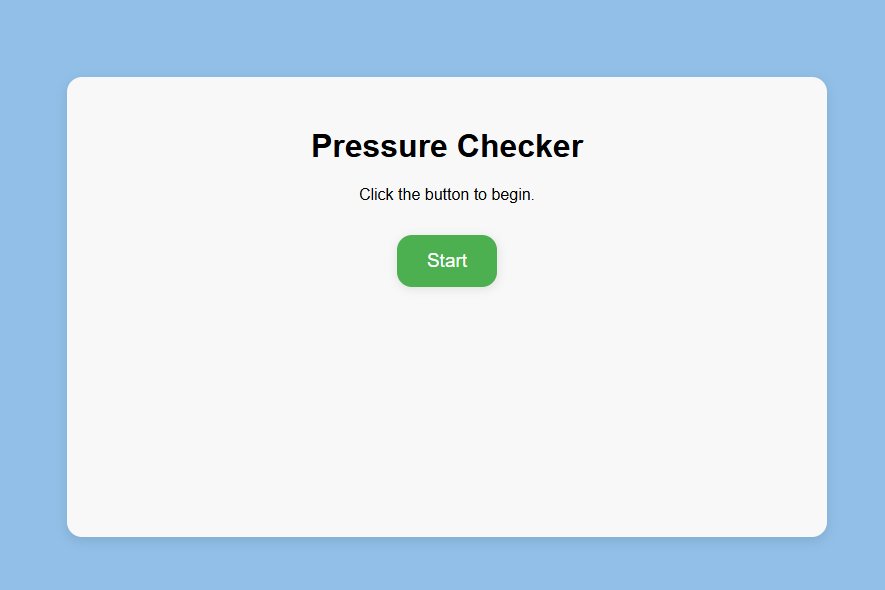
**I’m going to be coding a website with a form, and questions that determine the mental pressure level of people. In the end, there will also be some solutions that might help people to reduce pressure. In my project, the title of the form is called, “Pressure checker,” and there is a subtitle under it. “Click the button,” and there will be a start button. After clicking the button, a message will pop out saying, “Please select the honest answer you are feeling and take care!,” this message will stay for 2 seconds. Next, the first question will show up, with four answers. There will also be some questions with more than four options. After clicking an answer, the second question appeared, and continued, until it reached question 15. Later, when you have finished all the questions, there will be a sentence saying, “Your pressure level is” and according to your response, it will calculate your percentage. Therefore, you will see two buttons, one “Solution” button, and another “Restart” button. Clicking the “Solution” button, many resolutions will appear, those help with decreasing your stress. At last, you can click the “Restart” button to refresh the page, so no one can see your result.** **Material needed: computer.**
**Basic Structure:**
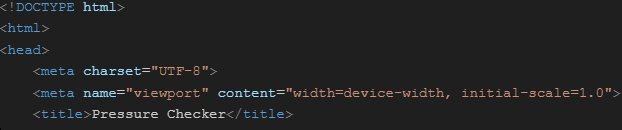
*** **1.First, I start with some basic structure, like “!DOCTYPE html,” so the browser will know it’s a html file. 2. Next is the “\\html” tag, it must be on the top and bottom of the script, this tag creates a starting point. 3. The next section is the “\\head,” everything inside this portion is important information, but it doesn’t show directly on the website. For example, title, styles, and etc.** **4\. Now let’s talk about code inside the head\, such as “\meta charset="UTF\-8"\\,” \(This part needs to be read before anything else\.\) this phrase of code symbolizes what language could this page use\. In this case\, I could use emoji\, accent\, English\, and more\. 5\. I also added “\meta name="viewport" content="width=device\-width\, initial\-scale=1\.0"\\,” to make sure the website match perfectly with the screen size\, without looking like zooming in or zooming out\. 6\. Next\, I created a title for my page “\title\,Pressure Checker\,/title\\,” my title of the webpage is “Pressure Checker\.”**
**Css styling**
***
**7\. A website with no color is boring\, so I use “\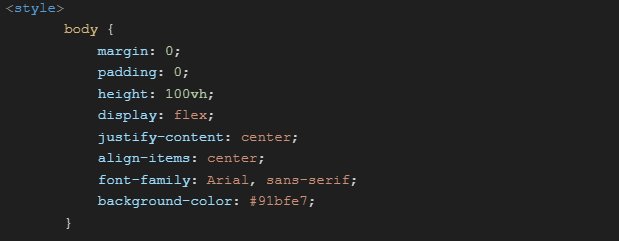
**Then, I use “height: 100vh;,” which will make my website take 100% height (viewpoint height) of the screen. After, I add “display: flex;,” it turns the body into a flexbox/ container. This line must be working with other lines or it does nothing. One of the lines it needs to work with is “justify-content: center;,” this sentence is responsible for aligning my x axis to the center. After, I have “align-items: center;,” this line aligns my y axis to the center.** **I use “font-family: Arial, sans-serif;” to define my font-family for this page which is “Arial,” if it doesn’t work, use “sans-serif.” I changed the “background-color: #91bfe7;”(the color of the website)to light dark blue, similar to a pastel color. I close the body up when I finish, by using this “}.”**
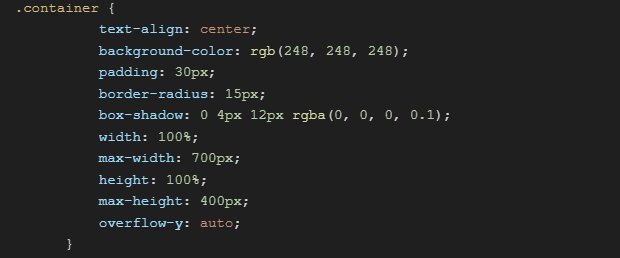 **Next, I style my “.container {“ which is the box, as you might notice, there is a dot in front of the container; that is a very important dot, it helps the container to classify as a class (a class can name a group of things). I start with “text-align: center;,” which center all the text inside the container. Then, “background-color: rgb(248, 248, 248);,” I change my background color of the container to white. In this line “padding: 30px;,” it creates 30 pixels of space between my box and the words on every side. Next, “border-radius: 15px;,” this line creates a 15 pixel curved corner for the box. After, I added “box-shadow: 0 4px 12px rgba(0, 0, 0, 0.1);,” by putting this line, it will add some shadow behind the box, first number defined as the axis x, second number add shadow axis y. The color of my shadow is black, but the color is very light. “width: 100%;,” the width is 100%. “max-width: 700px;,” the last line saying width is 100% it will become 700px. “ height: 100%;,” this takes all the space in height. “max-height: 400px;,” so the same as the width, 100% height can only take 400px. “overflow-y: auto;,” this line means if the things inside overflow, it gives a scrollbar. I finished styling my box, so I’ll close it up “}.”**
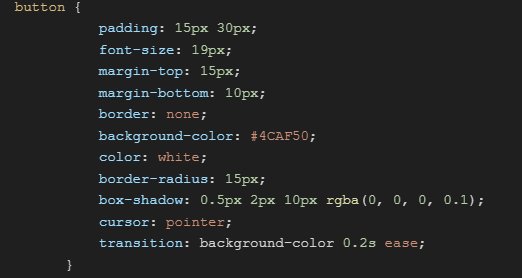 **Then, I continue with my “button,” it styles all the buttons in my page. “padding: 15px 30px;,” creates 15px of space on the top and the bottom between my box and the info, and 30px of space on the left and right between my box and the info. “font-size: 19px;,” all the text inside the buttons are 19 pixels. Next, I added “margin-top: 15px;,” and “margin-bottom: 10px;.” They create 15px space on top of the button outside, and 10px on the bottom, the code sometimes will work sometimes not; it depends if there is an element on top or not. And since I don’t want border around my button, so I added “border: none;.” “background-color: #4CAF50;,” the background color (the color of the button) is a soft leaf green. And the text color is white “color: white;.” After, I put “border-radius: 15px;” to make a 15 pixels curved corner for all the buttons. Then, I added “box-shadow: 0.5px 2px 10px rgba(0, 0, 0, 0.1);,” which creates 0.5 pixel on the axis x, 2 pixel on axis y, and 10 pixel for blur radius. The color is black. Next line is “cursor: pointer;,” it changes a mouse to a hand when it is hovering over the button. I also wanted an animation, so I added “transition: background-color 0.2s ease;,” it changes the background color for 0.2s, and the animation begins slow and fast. I finished designing my buttons; I closed it up. The last line was saying the background- color of the button will change, therefore I’m deciding what background color to put in this next part.**
 **Furthermore, I added a “button:hover {,” with this, the browser knows it’s when the cursor hover on the button. Then, I added the color, “background-color: #45a049;” it changed my background color to darker green; I closed it up, since I have finished.**
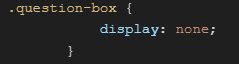 **I make a class called “.question-box” in which all my questions are in it. But first, all the questions have to be hidden, so I put “ display: none;” I close it up “}.”**
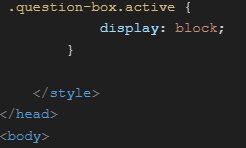 **Then I open “.question-box.active {.” In order to show the question when they are ready, I need to put “display: block;,” if the question has “active” behind them, they will show. Finally, I finished all the styling, so I close it up with “\/style,” and “\/head” 8. Next, I open the “\body,” which will be everything visible on the page.**
**Content**
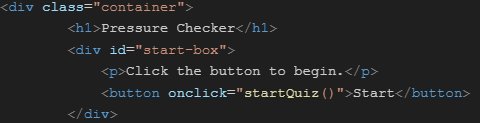 ***
**First, I create “div class="container",” and put “h1,Pressure Checker,/h1.” The class is called “container”; inside the “container,” I inserted my main heading which was named “Pressure Checker” . Secondly, I put in “div id="start-box",” I created a box, but I didn't close my container yet, since the “start-box” is inside it. Then I added “p,Click the button to begin.,/p” to create a message. And I added my first button, “button onclick="startQuiz()">Start,/button” when the start button is clicked, it will run the function called startQuiz, which I will work on later. At last, I put “/div” to close it up.**
***
**First, I create “div class="container",” and put “h1,Pressure Checker,/h1.” The class is called “container”; inside the “container,” I inserted my main heading which was named “Pressure Checker” . Secondly, I put in “div id="start-box",” I created a box, but I didn't close my container yet, since the “start-box” is inside it. Then I added “p,Click the button to begin.,/p” to create a message. And I added my first button, “button onclick="startQuiz()">Start,/button” when the start button is clicked, it will run the function called startQuiz, which I will work on later. At last, I put “/div” to close it up.**
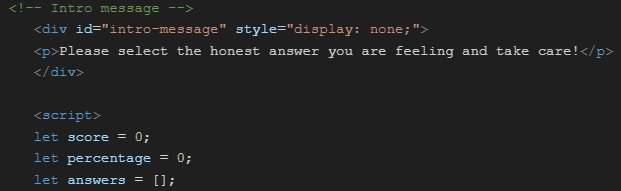 **“!-- Intro message --" (this part is to tell me it is an intro message)Then, I added a value calls intro message, and hide it “div id="intro-message" style="display: none;"” the message is “p,Please select the honest answer you are feeling — and take care! ,/p,” and close it up with “/div.” After, I open the Java script; I set the score and percentage to zero when it begins “script, let score = 0; let percentage = 0; let answers = [];.” The last line created a variable calls answers and it will remember what answers you put for each question, so if you go back you can change it.**
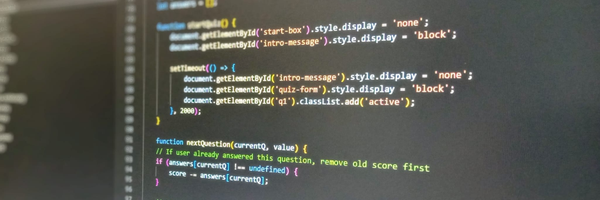
 **Now, I start to code my “startQuiz” function, “function startQuiz() { document.getElementById('start-box').style.display = 'none';” when the “startQuiz” function runs, the browser will find start-box and keep it hidden. “document.getElementById('intro-message').style.display = 'block';,” then, the browser will find intro-message and make it appear.**
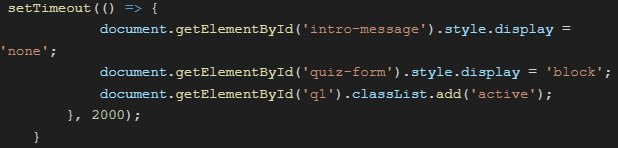 **In this part, I will be coding how long the intro message is going to stay. “setTimeout(() => {document.getElementById('intro-message').style.display = 'none';.” After the time runs out, the intro stops showing. “document.getElementById('quiz-form').style.display = 'block'; ,”and show the quiz-form that I will be coding later. “document.getElementById('q1').classList.add('active');}, 2000);}.” Before, there was a line in CSS that said “.question-box.active {display: block;},” so I added “active” to question 1, so it shows. Then, I close the middle part up. And write down the seconds I want the message to stay, which is 2000 milliseconds(2 sec).**
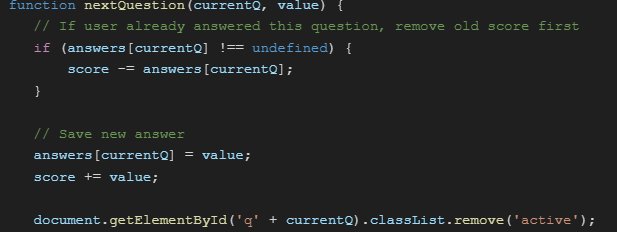 **I had created a function called “nextQuestion” “function nextQuestion(currentQ, value) {.” In the end of the code shows that questions go first and the second number is the value. “/ If the user already answered this question, remove the old score first,” this is just a message about what is happening. “if (answers[currentQ] !== undefined) { score -= answers[currentQ]; },” in this code it is asking, “is this question already answered or not?” If yes, it will help you minus the point you have chosen the first time. And now it will be saving a new answer, “ // Save new answer ,” this is just a reminder. Then, this line will save the value you pick for the question “answers[currentQ] = value;.” And add the value in the current score “score += value;.” And stop showing the question after is been answer, “document.getElementById('q' + currentQ).classList.remove('active');.”**
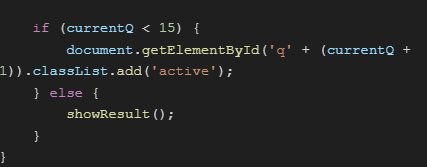 **“if \(currentQ < 15\) \{document\.getElementById\('q' \+ \(currentQ \+ 1\)\)\.classList\.add\('active'\);\,“ if the question is smaller than 15\, find the current question and plus one\, then gives it a tag called active\. Otherwise\, “\} else \{ showResult\(\); \} \}\,”run the function “showResult\,” which I will work on later. And I close up both of them\.**
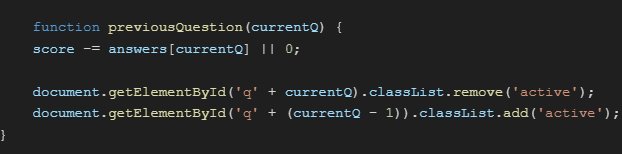 **Here\\, I created another function calls “previousQuestion” “function previousQuestion\(currentQ\) \{\.” The first action it do is to subtract the answers when going back to the last question “score \-= answers\[currentQ\] \|\| 0;\\,” the last part of this code makes it much safer to use this function because if the question had not been answered\\, change the score to zero\. Then\\, the browser finds current question\\, and stop it from showing\\, “document\.getElementById\('q' \+ currentQ\)\.classList\.remove\('active'\);\.” And go back to the last question and make it appear again “document\.getElementById\('q' \+ \(currentQ \- 1\)\)\.classList\.add\('active'\); \}\.”**
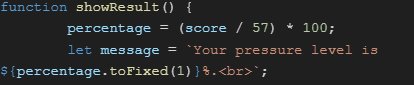 **The next function is called “showResult,” it will show after finishing the form “function showResult() {.” In this function, the first thing it does is to put the score out of 57 (Total point by adding up all the highest point in all the question), and times it by 100 which will create the percentage, “percentage = (score / 57) \* 100;.” Afterward, it will print a message, saying “Your pressure level is,” and it will show your percentage with one number after the decimal point “let message = \`Your pressure level is ${percentage.toFixed(1)}%.\
\`;,” if there is another sentence, it will be moved to the next line.**
**The next function is called “showResult,” it will show after finishing the form “function showResult() {.” In this function, the first thing it does is to put the score out of 57 (Total point by adding up all the highest point in all the question), and times it by 100 which will create the percentage, “percentage = (score / 57) \* 100;.” Afterward, it will print a message, saying “Your pressure level is,” and it will show your percentage with one number after the decimal point “let message = \`Your pressure level is ${percentage.toFixed(1)}%.\
\`;,” if there is another sentence, it will be moved to the next line.**
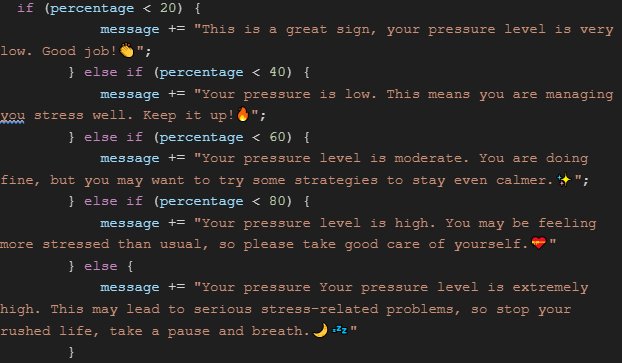 **In each pressure level, it will let out a different sentence, “ if (percentage < 20) { message += This is a great sign, your pressure level is very low. Good job!👏"; } else if (percentage < 40) {message += "Your pressure is low. This means you are managing your stress well. Keep it up!🔥"; } else if (percentage < 60) {message += "Your pressure level is moderate. You are doing fine, but you may want to try some strategies to stay even calmer.✨"; } else if (percentage < 80) { message += " Your pressure level is extremely high. This may lead to serious stress-related problems, so stop your rushed life, take a pause and breath.🌙💤"; }.”**
 **When the form gets to question 15, the browser will find question 15 and remove the active from it, “document.getElementById('q15').classList.remove('active');.”**
**Then, it will look through the whole page to find result-text and put in the value message in it, “document.getElementById('result-text').innerHTML = message;.” After, this line tells the browser to find the result-box and add active, so it will be visible, “document.getElementById('result-box').classList.add('active'); } \/script,” and at last I close up my script.**
**When the form gets to question 15, the browser will find question 15 and remove the active from it, “document.getElementById('q15').classList.remove('active');.”**
**Then, it will look through the whole page to find result-text and put in the value message in it, “document.getElementById('result-text').innerHTML = message;.” After, this line tells the browser to find the result-box and add active, so it will be visible, “document.getElementById('result-box').classList.add('active'); } \/script,” and at last I close up my script.**
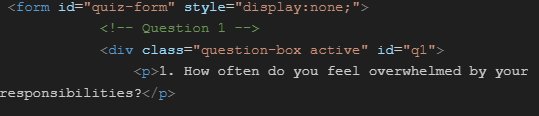 **Now, I’m going to talk about the form. First,I created a form, so it will save data and I named it “quiz-form.” Then, I hide all the questions until the start button is clicked, “ \\
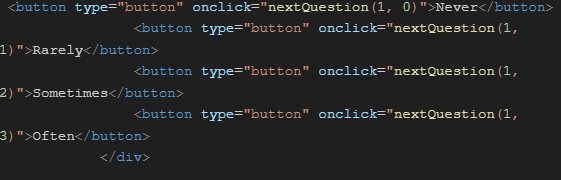 **“\button type="button" onclick="nextQuestion(1, 1)">Rarely\,/button,” the second one is “Rarely,” and the value would be 1 “\button type="button" onclick="nextQuestion(1, 2)">Sometimes\,/button,” the third one is “Sometimes,”for this answer the value would be 2 “\button type="button" onclick="nextQuestion(1, 3)">Often\,/button,” and the last one is “Often,” the value would be 3, “\/div,” after finishing writing question 1, I close it up.**
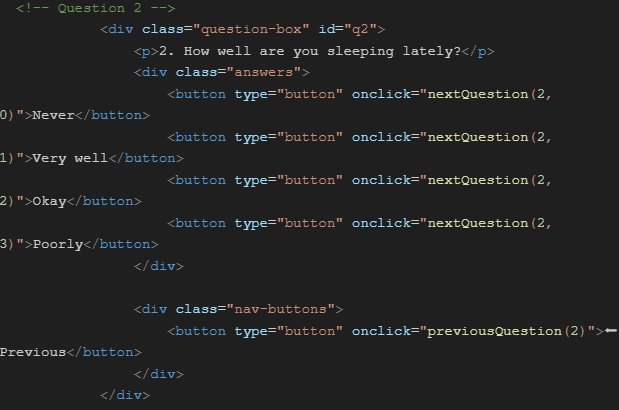 **Now I move on to question 2 “ <!-- Question 2 →” it’s going to be the same thing as question one, except the answer are organized in a class calls “answers” the question number will be changed, and I also added a previous button, “\div class="question-box" id="q2", \p,2. How well are you sleeping lately?\,/p, \div class="answers",” I created a class to organized the answers in one place, “\button type="button" onclick="nextQuestion(2, 0)">Very well,/button, \button type="button" onclick="nextQuestion(2, 1)">Well\,/button, \button type="button" onclick="nextQuestion(2, 2)">Okay\/button, \button type="button" onclick="nextQuestion(2, 3)">Poorly\,/button \/div,” I close up the question, and open another one for my “Previous” button, “\div class="nav-buttons",” it clarified it is a navigation button. “\button type="button" onclick="previousQuestion(2)">⬅ Previous\,/button,” this line creates the button, and when on click, it will runs the function calls “previousQuestion,” which I made earlier. The number in the parentheses tells the browser which question it is on, so it will be easier to find the last question. And for that I close up both of my “div” to finished my question 2 “\/div, \/div.” All the questions are written like question number 2 except the question number, and some of the questions have more answers to pick from than the others.**
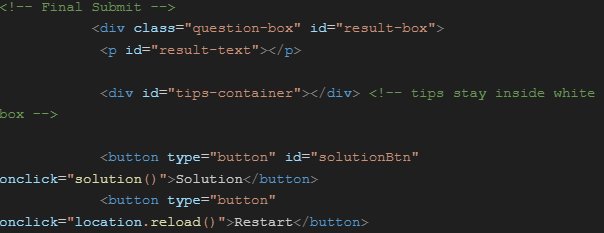 **As usual the green lines are just there as a reminder, “ \!-- Final Submit --.” Then, I added “\div class="question-box" id="result-box",” this line will add a new id called “result-box” in the “question-box.” And it is hidden at first because of the ".question-box display: none;." Next, it prints the “result-text” which is the message that I was coding earlier, “\p, id="result-text">\,/p.” To make this more helpful, I added some ways to help reduce or balance pressure. So I created a “tips-container,” “\div id="tips-container">\,/div.” Then, I created another button called “solutionBtn” “\button type="button" id="solutionBtn" .” When this button is click, it will run the function calls solution, “onclick="solution()">Solution\, /button.” Next to the solution button, I created another button calls Restart which let you to reload the page, “\button type="button" onclick="location.reload()">Restart,/button.”**
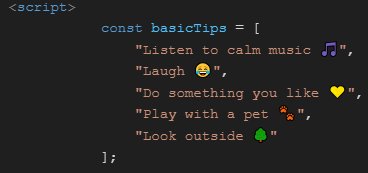 **After, I open my script again to put my solution/ tips, “\script, const basicTips = [ "Listen to calm music 🎵", "Laugh 😂", "Do something you like 💛", "Play with a pet 🐾", "Look outside 🌳" ];,” by putting “const” before the name, it won’t be changeable or replaceable. In my basic tips, there are 5 tips.**
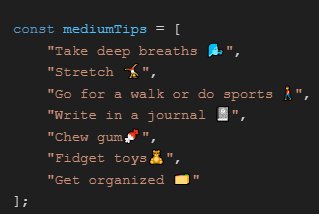 **Next, there is my medium tips, “const mediumTips = [ "Take deep breaths 🌬️", "Stretch 🤸", "Go for a walk or do light sports 🚶", "Write in a journal 📓", "Chew gum", "Get organized 🗂️" ];,” and here are 7 new tips.**
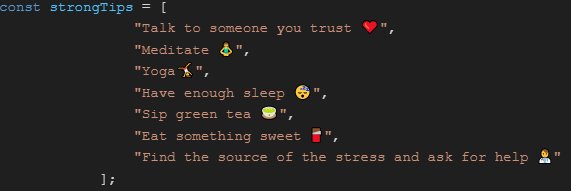 **At last, there are strong tips which can help to deal with higher level of stress, “const strongTips = [ "Talk to someone you trust ❤️", "Meditate 🧘", "Yoga", "Have enough sleep 😴", "Sip green tea 🍵", "Eat something sweet 🍫", "Find the source of the stress and ask for help" ];.” **
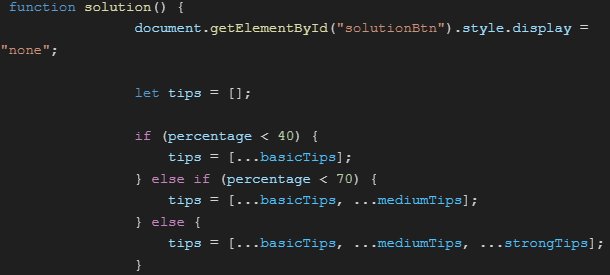 **When the solution function runs, the browser will hide the solution button, “function solution() { document.getElementById("solutionBtn").style.display = "none";.”The browser will give you different tips according to your score from that form, “let tips = []; if (percentage < 40) { tips = [...basicTips];,” if the percentage was lower than 40, it will give you the basic tips. “} else if (percentage < 70) { tips = [...basicTips, ...mediumTips];},” and when the percentage is lower than 70, it will give you basic tips plus medium tips. “else { tips = [...basicTips, ...mediumTips, ...strongTips]; },” otherwise the browser will give you all the tips, including basic tips, medium tips, and strong tips.**
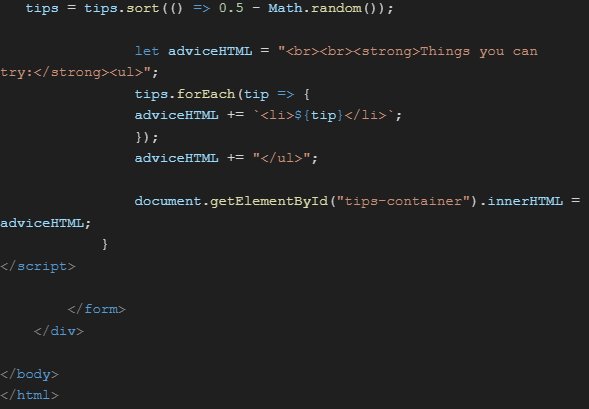 **I want the tips to not be in order, so I added in this line “tips = tips.sort(() => 0.5 - Math.random());.” I’m not finish with it yet, it still need a leading sentence, “let adviceHTML = "\
\
\strong,Things you can try:\/strong>\ul";,” this will be store in “adviceHTML.” And it has two lines break,so this message will be on the next line. The text will be in bold, it will print the message “Things you can try:” the list after this sentence will not be in order. This next line will turn all the tips into a list item, store every items in “adviceHTML” and close the unorder list “tips.forEach(tip => { adviceHTML += \`\li,${tip}\/li,\`; });adviceHTML += "\/ul,";.” Next, put everything inside “adviceHTML” in the tips-container, “document.getElementById("tips-container").innerHTML = adviceHTML; }.” FInally, I close up everything, my script, form, div, body, and html, “\/script, \/form, \/div, \/body, \/html”.**
**I want the tips to not be in order, so I added in this line “tips = tips.sort(() => 0.5 - Math.random());.” I’m not finish with it yet, it still need a leading sentence, “let adviceHTML = "\
\
\strong,Things you can try:\/strong>\ul";,” this will be store in “adviceHTML.” And it has two lines break,so this message will be on the next line. The text will be in bold, it will print the message “Things you can try:” the list after this sentence will not be in order. This next line will turn all the tips into a list item, store every items in “adviceHTML” and close the unorder list “tips.forEach(tip => { adviceHTML += \`\li,${tip}\/li,\`; });adviceHTML += "\/ul,";.” Next, put everything inside “adviceHTML” in the tips-container, “document.getElementById("tips-container").innerHTML = adviceHTML; }.” FInally, I close up everything, my script, form, div, body, and html, “\/script, \/form, \/div, \/body, \/html”.**
 **The last part is to turn it into a website. I open a folder in my browser and name it, “templates”(can be named anything). Make sure the code file ends with “.html.” Afterwards, I put the code in the folder I just created, so I don’t lose anything. Click the folder, and click the index.html(the code), it will open on google on a website.**
**Any AI?**
**You might be asking if I use chatGBT or other article intelligence. My answer is yes, but why? Because chatGBT helps with organizing the code after I finish coding which makes the code easier to see and less complicated. It also corrects and gives suggestions to which code will be better used in those situations. Another reason is that chatGBT helps me develop a deeper understanding of codes, which can help me while presenting and dropping important code to remind myself later on. Then, I also use chatGBT when I need to turn my code into a website. I tried searching through youtube, but chatGBT has the simplest way and the easiest explanation to read.**
**On the other hand, I also use chatGBT to review my questions, make sure they are actually stress-related and write them in a more formal and correct way, so people wouldn’t feel stressed while reading the question since they might not understand.**
Analysis
In this project, I had to code a form that will help people to evaluate their mental pressure level.
To start, click the start button and answer the question truthly, or else it won’t give you your true pressure level. After answering the questions, it will show your average mental pressure in percentage and there will be two buttons, one for solution and one for restart. The solution one will give you some advice that you could try and the restart button just how you reload the page.
| Basic Structure | I started with some basic structure in html, like “!DOCTYPE html” which tells the browser this is a html file. Then, there is “head” for the title, the language it is using, styling and a starting point. This helps my code a lot because it is a place where I could put data about the page that is making it more interesting with more variety. Next, we have the “body” for the container such as, the headings, starting button and other buttons, intro message, intro settings, and a form to arrange all of the questions in place. |
|---|---|
| CSS Styling | In my code, I also used CSS styling in the “style” section. I remove spaces that are not needed, adjust container, page or buttons’ size, center item, set the font, change background-color, align text, add shadow around boxes and buttons, rounded corners up, so it looks , creates transitions, etc. |
| JavaScript | Then, I used Javascript to complete my function. For example, I use the value “score” to keep track of the point. I have an “answer” which will remember each response you put for all the questions. After, I have the “function” called “startQuiz,” it will hide the “start” button, and also show the intro message. It contains a timer of how long the intro message is staying. The next function is called “nextQuestion,” it helps with moving on with the question. Then, there is the “previousQuestion” function, it lets us help the ability to move back one question when we have picked the wrong answer. And the last function is “showResult,” this helps us put our score in a total of 57, and turn it to the percentage with a different message coming out according to your score. It seems like that was not the last function, there is one more function at the bottom which is called “solution,” I have put in many solutions in order to help people to decrease their pressure. In each pressure, it will give out different tips for us to use. |
In this project, I learned how html, Javascript, and css could be used together, and I learned what each one does. This project helps me with developing my understanding of code and how they structure. Some feedback that I received and I could improve on is that the question could be more precise and increase the amount of scale.
Conclusion
Conclusion
In conclusion, each person has pressure, and their pressure level will depend on how much responsibility they have in their life. There are many problems in life that couldn't be solved for a very long time, and when that happens people feel anxious, worried, scared, etc. All this emotion would lend toward pressure, but in this world everyone will always have this kind of emotion, no matter if you are a child, teenage, adult, a girl or a boy, even animals will get all this feeling; it is normal to get pressure, sometimes it is also good to have pressure. It helps people to reach their deadline, but if there is too much pressure, it will be bad for your health. It is good to have them, but not too much. We just need to be aware of our pressure. Now, some people might be asking, "How do we reduce our pressure? Well, there’re many different ways to reduce pressure, there are different ways of reducing pressure for each person. For example, listen to music, do yoga, write a diary, talk to someone, and more.
Citations
Ann Pietrangelo and Nicole Washington, DO, MPH, The Effects of Stress on Your Body, healthline.com, July 1, 2025, https://www.healthline.com/health/stress/effects-on-body
Henry Ford Health Staff, How Stress Affects Digestion—And What You Can Do About It, henryford.com, July 26, 2021, https://www.henryford.com/blog/2021/07/how-stress-affects-digestion
American Heart Association News, Chronic stress can cause heart trouble, heart.org, February 4, 2020, https://www.heart.org/en/news/2020/02/04/chronic-stress-can-cause-heart-trouble
National Cancer Institute, Stress and Cancer, cancer.gov, October 21, 2022, https://www.cancer.gov/about-cancer/coping/feelings/stress-fact-sheet
National Library of Medicine, Chronic Stress Effects on Tumor: Pathway and Mechanism, pmc, https://pmc.ncbi.nlm.nih.gov/articles/PMC8720973/
Sherri Gordon, Elle Markman, PsyD, Can Stress Make You Sick?, health.com, June 8, 2024, https://www.health.com/can-stress-make-you-sick-8653971?utm_source=chatgpt.com
Wikipedia, Hypothalamic–pituitary–adrenal axis, en.wikipedia.org, 26 January 2026, https://en.wikipedia.org/wiki/Hypothalamic%E2%80%93pituitary%E2%80%93adrenal_axis?utm_source=chatgpt.com
National Library of Medicine, The stress hormone norepinephrine increases migration of prostate cancer cells in vitro and in vivo, pubmed, https://pubmed.ncbi.nlm.nih.gov/26058426/
Government of Canada, Mental Health - Coping With Stress, canada.ca, 2017-05-04, https://www.canada.ca/en/health-canada/services/healthy-living/your-health/lifestyles/your-health-mental-health-coping-stress-health-canada-2008.html
University of Colorado Boulder, 25 Quick Ways to Reduce Stress, colorado.edu, https://www.colorado.edu/law/25-quick-ways-reduce-stress
Acknowledgement
Acknowledgement
Thank you to all who help me during this project. I especially appreciate my parents who supported me when I was having difficulty continuing my project and was about to give up. I also want to thank our teacher for providing the technology and material each week. Then, I have to thank my friends for encouraging me during my projects. And last, I want to thank the workers and volunteers who contributed an effort in the cysf program which give me the opportunity to participate in such a great event. Last, I want to give a big thank you to all the readers/ judges who listen and read my presentation.